teachComputing
  • Home
  • AI
    • AI Literacy >
      • AI Alliteration
      • Describing Monsters
      • Dystopian writing
      • Bringing literacy to life with AI
      • AI Literacy Prompts
    • AI Computing >
      • AI Computing Lessons >
        • Fake News
        • Make me happy
        • Chatting Robot
        • Supervised Learning
        • Fooled
        • Socratic Debate
        • Moral Machine
        • Invisible Animals
      • AI Coding Strategies
      • AI Computing Prompts
    • AI Prompts
  • Teaching & Learning
    • Wellbeing
    • Blog
    • Humour >
      • Teacher Humour
      • Teacher Humor
    • PLN Challenge >
      • Covering your backside
      • Online Privacy
      • Twitter Challenge >
        • Twitter All Star
        • Challenge 1
        • Challenge 2
        • Challenge 3
        • Tips for staying safe on Twitter
        • Tips for hosting Edu Twitter Chats
        • Tips for taking part in Twitter chats
        • It's all about the hashtag! Essential chats for educators
        • How to storify a chat
        • How to schedule Tweets
        • Twitter Lists
        • NT2tEU
      • Facebook Challenge >
        • Challenge 4
        • Challenge 5
        • Challenge 6
        • Tips for staying safe on Facebook
      • Google Challenge >
        • Challenge 7
        • Challenge 8
        • Challenge 9
      • Pinterest Challenge >
        • Challenge 10
        • Challenge 11
        • Challenge 12
        • Tips for using Pinterest
      • Blog Challenge >
        • Challenge 13
        • Challenge 14
        • Challenge 15
        • How to create a classroom blog
      • Staffrm Challenge >
        • Challenge 16
        • Challenge 17
        • Challenge 18
      • Skype Challenge >
        • Challenge 19
        • Challenge 20
        • Challenge 21
      • Edmodo Challenge >
        • Challenge 22
        • Challenge 23
        • Challenge 24
      • TeachMeet Challenge >
        • Challenge 25
        • Challenge 26
        • Challenge 27
      • In-school challenge >
        • Challenge 28
        • Challenge 29
        • Challenge 30
      • 30 ways to grow your PLN
    • Tools for Teachers >
      • Web 2.0 >
        • Top 10 Web 2.0 Tools
        • Classroom Response Tools
      • Quiz Tools
      • Classroom Management Tools
      • Software >
        • Media Conversion Tools
        • Application Software
      • Multimedia >
        • Free Music
    • BYOD
    • Digital Leaders >
      • Digital Leaders Blog >
        • DL Archive
      • DL Tips
      • Quotes
      • Links
    • Flipped Learning >
      • Flipped Classroom vs. Blended Classroom
    • Gamification >
      • Gamification vs. Game Based Learning vs. Game Design
    • School Closures
    • Game Based Learning >
      • Minecraft >
        • Minecraft in Education
        • Minecraft Lesson Ideas
        • Minecraft Literacy
        • Real Life Minecraft
        • Minecraft Top Tips
        • Minecraft Coding Tutorials >
          • Minecraft Code Builder Setup
          • Minecraft Code: Walking on Air
          • Minecraft Code: Hello World
          • Minecraft Code: Functions
          • Minecraft Code: Rainbow
          • Minecraft Code: Skyscraper
          • Minecraft Pixel Art >
            • MC Pixel Art Painter
    • The magic of >
      • The magic of Computing
      • The magic of Maths
      • The magic of Science
      • The magic of Literacy
    • Road2e2
    • T&L Blog
  • Computing
    • Computing Blog >
      • GCSE Computer Science
      • General
    • Teaching Computer Science >
      • CPD >
        • Blocks to Code
        • Tutorials >
          • How to embed Flash into PowerPoint
          • How to embed YouTube videos in to PowerPoint
          • How to create a wiki
          • How to create a classroom blog
      • Schemes of Work
      • Programming Resources
      • Theory
      • Posters >
        • Binary Posters
        • Coding Posters
      • Festive Computing Activities
      • FLOPPYS 2020
      • FLOPPYS 2021
      • FLOPPYS 2022
      • Game Design
      • App Creation
    • Theory Lessons >
      • Theory Tests
      • Computer Hardware >
        • Input / Output
        • CPU
        • LMC
        • Storage Devices
        • Memory (RAM / ROM)
        • Hardware
      • Binary Lessons >
        • Units of Data
        • Binary & Denary >
          • Binary & Denary (Festive)
        • Binary Representation of Images >
          • Binary Representation of Images (Festive)
          • Pixel Painter
        • Binary Representation of Characters
        • Binary Representation of Sound >
          • ADC Simulator
        • Binary Representation of Instructions
        • Binary Addition
        • Hexadecimal
      • Software >
        • Operating System
        • Types of Software
        • Utility Software
      • Programming >
        • Flowcharts >
          • Tea Algorithm
          • Flow diagrams
      • Computational Thinking >
        • Data Science
    • Digital Literacy >
      • Social Media (Good or Bad thing?)
      • Cyberbullying
      • Staying Safe Online
    • Games >
      • Binary Games >
        • Binary Blitz!
        • Binary Brainiac
        • Binary Blaster
        • Binary Blast Off
        • Binary Flip
    • Binary >
      • ASCII Converter
      • Binary to Decimal
      • Binary to Hex
      • Binary Calculator
    • Escape Rooms >
      • Breakout Edu
      • Escape Timers >
        • Escape Timer
        • Team Timer
        • Binary Timer
      • Binary Escape
    • ICT Strand >
      • Fake News Project >
        • Fake News 1
        • Fake News 2
        • Fake News 3
        • Fake News 4
        • Fake News 5
      • Spreadsheet Modelling
      • Superhero Movie Trailer
      • PowerPoint Task
      • Digital Imaging
      • Paint 3D Tutorial
    • CS Toolkit >
      • AI Toolkit
      • Binary Toolkit
      • Coding Toolkit
    • Coding Strategies >
      • Worked Examples
      • Code Tracing
      • Parsons Problems
      • PRIMM
    • Programming Lessons >
      • Scratch >
        • Festive Scratch >
          • Music Festive with Scratch
          • Turtle Snowflakes
          • What's your elf name
          • Secret Santa
        • Making music with Scratch
        • Sorting Hat Lesson
        • Turtle Time
        • Superhero name generator
        • Compliment Generator
        • Magic 8 ball
      • Python >
        • Chatbot
        • Coding Golf
        • Turtle Time >
          • Turtle Instructions
        • Magic 8 ball
        • Python Mad Libs
        • Rock Paper Scissors
        • Shakespearean Insult Generator >
          • Shakespearean Insult Generator Part 2
        • Compliment generator
        • Sorting Hat
        • Superhero name generator
        • Cards Against
        • Guess the word
        • Guess the number
        • Festive Python >
          • What's your elf name
          • Secret Santa
          • Turtle Snowflakes
          • Let It Snow
      • Little Man Computer
      • Hour of Code >
        • Hour of Code Music
        • Python Tutorials
        • HoC 8-Bit Challenge
        • Music MicroPython (Festive)
      • Raspberry Pi >
        • Networking the Pi
        • Minecraft Pi
        • Harry Potter Sorting Hat >
          • Harry Potter Sorting Hat (GPIO)
        • Raspberry Pi LTSP (Networked Classroom)
        • Astro Pi
    • Homeschooling
    • Remote Learning >
      • Fun Python Tutorials
      • Python Tutorials >
        • Chatbot Tutorial
        • Dice Roll
        • Turtle Tutorial
        • Magic 8 ball
        • Sorting Hat
        • Rock Paper Scissors Tutorial
        • Cards Against
        • Python Mad Libs
        • Shakespearean Insult Generator >
          • Shakespearean Insult Generator Part 2
        • Guess the word
        • Guess the number
        • Superhero name generator
        • Compliment generator
        • Festive Python Tutorials >
          • What's your elf name
          • Secret Santa
          • Turtle Snowflakes
      • Scratch Tutorials >
        • Sorting Hat
        • What's your superhero name
        • Turtle Time Tutorial
        • Compliment Generator
        • Magic 8 Ball
        • Festive Scratch Tutorials >
          • Festive Music with Scratch
          • Secret Santa Scratch Tutorial
          • Turtle Snowflakes Tutorial
          • What's your elf name
    • Revision >
      • Data Representation >
        • Binary Representation of Images
        • Binary Representation of Sound
  • 21 Things
    • 21 Things To Try >
      • ConnectEd
      • Social Media >
        • Twitter
        • Pinterest
        • Facebook Groups
        • Facebook Pages
        • Google+ Communities
        • Staffrm
        • Edmodo
        • Mystery Skype
        • Blogging
        • Classroom Blogging
      • Gamification
      • Flipped Classroom
      • Breakout Edu
      • Edu Podcasts
      • Jar of Awesome
      • TeachMeet
      • Team Teaching
      • Mixed Reality
      • Digital Leaders
      • Genius Hour
      • Sketchnoting
    • Computing >
      • CS 20
      • Code Golf
      • PRIMM
      • Under The Hood
      • Unplugged
      • Podcasts
      • Facebook Groups CS
      • Flipped Classroom CS
      • Teach with Magic
      • Socratic Debate
      • Coding Music
    • 21 Things Keep Fit >
      • 20 Health Hacks
      • Home Health Hacks
    • 21 Things PLN >
      • Edmodo
      • Twitter
      • Reply to a blog
      • Skype
      • Cofee Edu
      • Pinterest
      • Reach out
      • Conferences
      • Instagram
      • Ning
      • MEC
      • Voxer
      • LinkedIn
  • Microbit
    • Physical Computing >
      • micro:bit LEDs
      • micro:bit PIR
      • micro:bit Servo
      • micro:bit Temp
      • micro:bit LDR
      • micro:bit Moisture
      • micro:bit RGB LEDs
      • micro:bit HC-SR04 3v3
      • micro:bit HC-SR04 5v
      • micro:bit Push button
      • micro:bit Potentiometer
      • micro:bit Piezo
    • Music >
      • Music Festive
    • Festive Projects
    • Projects >
      • Music
      • Music MicroPython
      • Servo Animals
    • Lessons >
      • Magic 8 Ball
      • Harry Potter Sorting Hat
    • Quick Start Guide
    • Microbit Simulator
  • #100 Ideas
    • Testimonials
    • Competition >
      • Competition 2
    • Worksheets
    • Bonus Ideas >
      • What's your elf name
      • Make me happy
      • Guess the word
      • Cards Against Humanities
      • Compliment generator
      • Data Science
    • Curriculum
    • ISTE
    • CSTA
  • About
    • Privacy

Turtle Snowflakes (with Python)

NOTE: A self-guided (in-browser) tutorial version of this lesson (suitable for remote / independent learning) can be found by here:
Turtle snowflake tutorial
Picture
Learning Objectives:

  • Understand and use sequence in an algorithm
  • Understand and use iteration in an algorithm (FOR and WHILE loops)


Curriculum Mapping:

KS2:

  • Design, write and debug programs that accomplish specific goals; solve problems by breaking them into smaller parts. Select, use and combine a variety of software on a range of digital devices to design and create a range of programs.
  • Use sequence, selection and repetition in programs; work with variables and various forms of input and output
  • Use logical reasoning to explain how some simple algorithms work; detect and correct errors in algorithms and programs


KS3:

  • Use two or more programming languages, at least one of which is textual, to solve a variety of computational problems.

STUDENT: COMPUTATIONAL THINKER:

  • 5a: Students break problems into component parts, extract key information, and develop descriptive models to understand complex systems or facilitate problem-solving.
  • 5c: Students break problems into component parts, extract key information, and develop descriptive models to understand complex systems or facilitate problem-solving.
  • 5d: Students understand how automation works and use algorithmic thinking to develop a sequence of steps to create and test automated solutions.


EDUCATOR: COMPUTATIONAL THINKING COMPETENCIES:

  • 4b: Design authentic learning activities that ask students to leverage a design process to solve problems with awareness of technical and human constraints and defend their design choices.


COMPUTER SCIENCE EDUCATORS:

  • 2a: Plan and teach computer science lessons/units using effective and engaging practices and methodologies:

i. Select a variety of real-world computing problems and project-based methodologies that support active and authentic learning and provide opportunities for creative and innovative thinking and problem solving

ii. Demonstrate the use of a variety of collaborative groupings in lesson plans/units and assessments

iii. Design activities that require students to effectively describe computing artifacts and communicate results using multiple forms of media

iv. Develop lessons and methods that engage and empower learners from diverse cultural and linguistic backgrounds

v. Identify problematic concepts and constructs in computer science and appropriate strategies to address them

vi. Design and implement developmentally appropriate learning opportunities supporting the diverse needs of all learners

vii. Create and implement multiple forms of assessment and use resulting data to capture student learning, provide remediation and shape classroom instruction


CSTA K–12 CS Standards:

  • 1B-AP-08: Compare and refine multiple algorithms for the same task and determine which is the most appropriate.
  • 1B-AP-09: Create programs that use variables to store and modify data.
  • 1B-AP-10: Create programs that include sequences, events, loops, and conditionals.
  • 1B-AP-11: Decompose (break down) problems into smaller, manageable subproblems to facilitate the program development process.
  • 1B-AP-13: Use an iterative process to plan the development of a program by including others' perspectives and considering user preferences.
  • 1B-AP-15: Test and debug (identify and fix errors) a program or algorithm to ensure it runs as intended.
  • 1B-AP-17: Describe choices made during program development using code comments, presentations, and demonstrations.
  • 2-AP-11: Create clearly named variables that represent different data types and perform operations on their values
  • 2-AP-12: Design and iteratively develop programs that combine control structures, including nested loops and compound conditionals.
  • 2-AP-15: Seek and incorporate feedback from team members and users to refine a solution that meets user needs.
  • 2-AP-16: Incorporate existing code, media, and libraries into original programs, and give attribution.
  • 2-AP-17: Systematically test and refine programs using a range of test cases.
  • 3A-AP-14: Use lists to simplify solutions, generalizing computational problems instead of repeatedly using simple variables.
  • 3A-AP-15: Justify the selection of specific control structures when tradeoffs involve implementation, readability, and program performance, and explain the benefits and drawbacks of choices made.

AREA OF LEARNING AND EXPERIENCE: Science and Technology:

Computation is the foundation for our digital world.

Progression step 3        

  • I can use conditional statements to add control and decision-making to algorithms.
  • I can identify repeating patterns and use loops to make my algorithms more concise.
  • I can explain and debug algorithms.


Progression step 4

  • I can decompose given problems and select appropriate constructs to express solutions in a variety of environments.
  • I can select and use data structures that efficiently manage data in algorithms.
  • I can plan and implement test strategies to identify errors in programs.


Progression step 5

  • I can identify, define and decompose problems, choose appropriate constructs and express solutions in a variety of environments.
  • I can use file-handling techniques to manipulate data in algorithms.
  • I can test, evaluate and improve a solution in software.


In this lesson, students will create snowflakes using the turtle library in Python.

Part 1

Start by sharing the following code. Ask students to make a prediction about the output from the code.
Ask students to make a prediction about the output from the code.

Run the code and aks the students if their predictions were correct.

Go through each line of code (line-by-line) and explain what each line does.

import turtle - Imports the turtle library
window = turtle.Screen() - Creates a new blank canvas to draw on
timmy = turtle.Turtle() - Creates a new turtle called timmy
timmy.forward(100) - Move the turtle forward 100 steps
timmy.right(90) - Rotates the turtle right by 90 degrees
timmy.forward(100) - Move the turtle forward 100 steps
timmy.right(90) - Rotates the turtle right by 90 degrees
timmy.forward(100) - Move the turtle forward 100 steps
timmy.right(90) - Rotates the turtle right by 90 degrees
timmy.forward(100) - Move the turtle forward 100 steps
timmy.right(90) - Rotates the turtle right by 90 degrees

Challenge 

Share the link to the code sample below and ask the students to modify their code to draw another regular polygon, e.g. triangle, hexagon etc.

​Sample code:
https://trinket.io/python/ed15bdc4a6
Alternatively, share the following code via Teams / Google Classroom etc. 
​import turtle #Import the turtle library
window = turtle.Screen() #Create a new window
timmy = turtle.Turtle() #Create a new turtle called timmy
timmy.forward(100)
timmy.right(90)
timmy.forward(100)
timmy.right(90)
timmy.forward(100)
timmy.right(90)
timmy.forward(100)
timmy.right(90)

Part 2

​Ask the students to identify the repeating pattern in the previous example. Answer: forward(100) + right(90) are repeated 4 times.

Ask students to suggest ways we can improve the code – draw out answers such as ‘use a loop’, ‘use a counted loop’, ‘use a repeat command’ etc.
 
Display the optimised solution for the previous example (see below) and have the students modify their own code to match the new solution.

Bonus Challenge

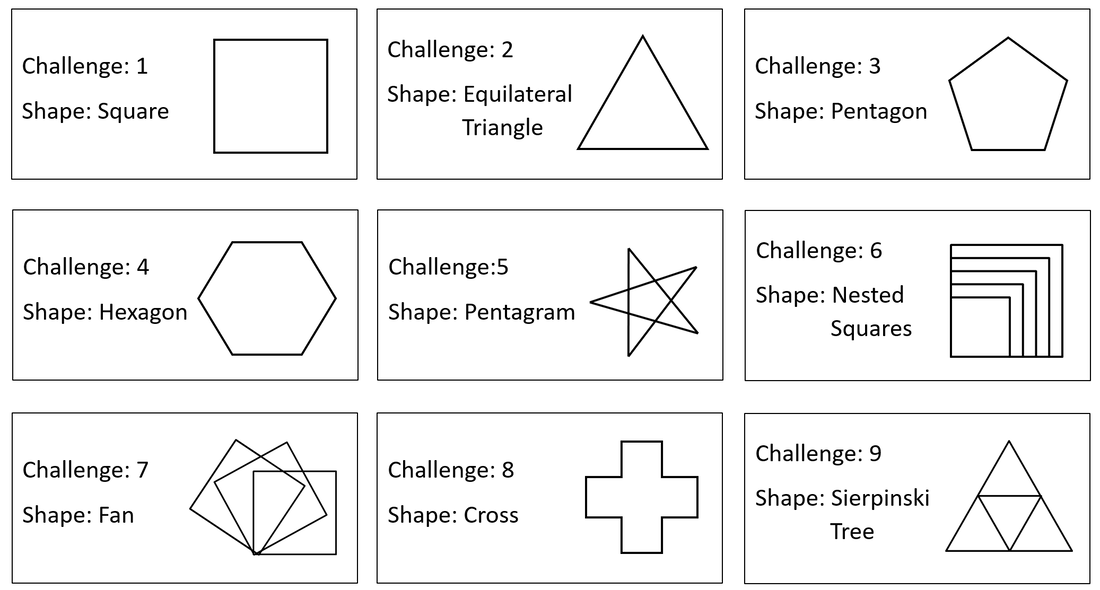
Time permitting, challenge the students to recreate one or more of the following shapes:
Picture
Helpful resources
challenge_cards.pdf
File Size: 111 kb
File Type: pdf
Download File

angles_worksheet.pdf
File Size: 140 kb
File Type: pdf
Download File


Part 3 - Snowflake Challenge

Share the following example: 
Challenge the students to guess the shape before running the sample code.

Explain to the students that they are going to use what they have learnt so far to draw a snowflake in Python. ​

​Share the following worked example with the students and have them tinker with the code.

Worked example:
https://trinket.io/python/144a0d13f5
​import turtle #This imports the turtle library
window = turtle.Screen() #This creates a new window
timmy = turtle.Turtle() #This creates a new turtle called timmy
for loopCounter in range(4): #Change the number of iterations 
  for loopCounter in range(2):
    timmy.forward(100)
    timmy.right(60)
    timmy.forward(100)
    timmy.right(120)
  timmy.right(90) #Change the angle

Challenge​

Challenge the class to see who can create the best snowflake.
Top tip: The last rotation (which in the above example 90 is degrees) can be calculated by dividing 360 degrees by the first 'repeat' value.
​For example, if the first repeat is 6 then the last turn should be 360 / 6 = 60. Try it! :)

​Advanced Snowflake


Plenary

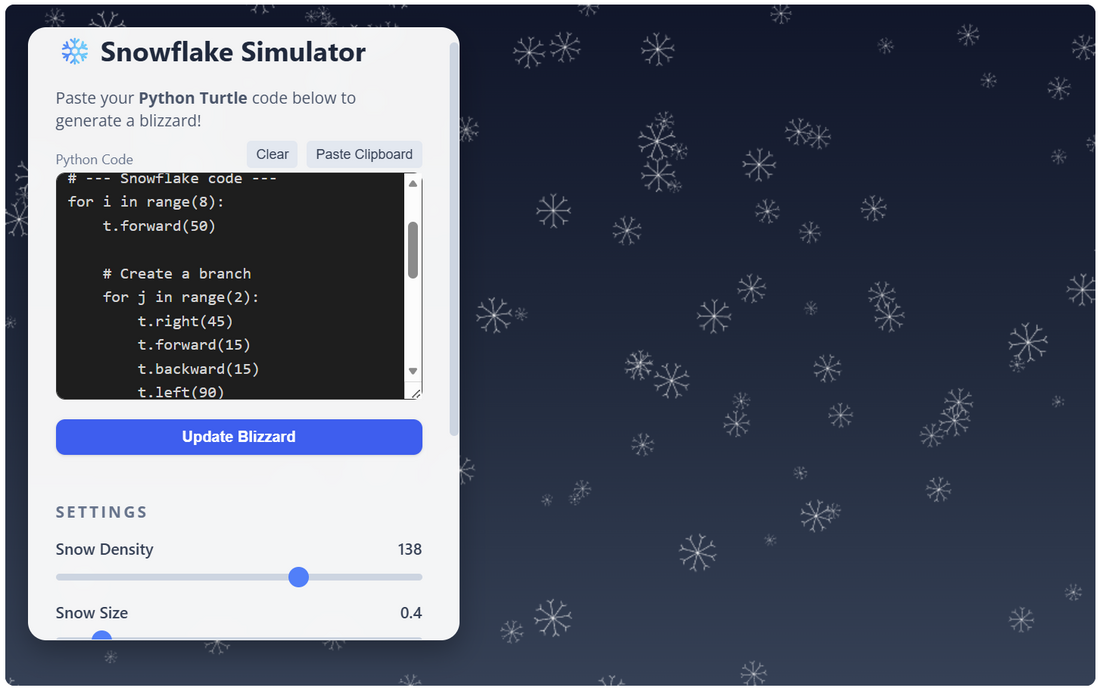
  • Direct students to: https://www.teachwithict.com/let-it-snow.html
  • Instruct students to copy and paste their Python snowflake code into the simulator
Picture
​Plenary: Snowflake simulator

​Strategies for Student Engagement
​
  • Encourage predictions and discussions to involve students actively in the learning process.
  • Provide hands-on practice with immediate feedback to reinforce learning.
  • Use visual aids (projector/whiteboard) to demonstrate concepts clearly.
  • Offer challenges and competitions to motivate students and foster a sense of achievement.

​Assessment Criteria
​
Student "I can" checklist

Part 1: The Basics (Sequence)
  • [ ] I can import the turtle library.
  • [ ] I can make the turtle move forward and turn at specific angles.
  • [ ] I can draw a simple shape (like a square) by writing a list of instructions.
Part 2: Loops (Iteration)
  • [ ] I can identify lines of code that are being repeated.
  • [ ] I can use a for loop to repeat code (e.g., for i in range(4):).
  • [ ] I can draw a square or triangle using only 3-4 lines of code inside a loop.
Part 3: Snowflake challenge (Nested loops)
  • [ ] I can put one loop inside another loop (nested loop).
  • [ ] I can can create a complex snowflake shape using nested loops.
  • [ ] I have created a snowflake that is fully symmetrical.
Part 4: Advanced (Functions & commenting)
  • [ ] I have defined a function (e.g., def draw_snowflake():) to organise my code.
  • [ ] I use random numbers to change the size, colour, or position of my snowflakes.
  • [ ] I have added comments (#) to explain what my code does.


You may also be interested in:
  • Code Golf​

Tags: programming language scratch, scratch programming language, scratch coding language, programming languages scratch, scratch code language, scratch programming language.
  • Home
  • AI
    • AI Literacy >
      • AI Alliteration
      • Describing Monsters
      • Dystopian writing
      • Bringing literacy to life with AI
      • AI Literacy Prompts
    • AI Computing >
      • AI Computing Lessons >
        • Fake News
        • Make me happy
        • Chatting Robot
        • Supervised Learning
        • Fooled
        • Socratic Debate
        • Moral Machine
        • Invisible Animals
      • AI Coding Strategies
      • AI Computing Prompts
    • AI Prompts
  • Teaching & Learning
    • Wellbeing
    • Blog
    • Humour >
      • Teacher Humour
      • Teacher Humor
    • PLN Challenge >
      • Covering your backside
      • Online Privacy
      • Twitter Challenge >
        • Twitter All Star
        • Challenge 1
        • Challenge 2
        • Challenge 3
        • Tips for staying safe on Twitter
        • Tips for hosting Edu Twitter Chats
        • Tips for taking part in Twitter chats
        • It's all about the hashtag! Essential chats for educators
        • How to storify a chat
        • How to schedule Tweets
        • Twitter Lists
        • NT2tEU
      • Facebook Challenge >
        • Challenge 4
        • Challenge 5
        • Challenge 6
        • Tips for staying safe on Facebook
      • Google Challenge >
        • Challenge 7
        • Challenge 8
        • Challenge 9
      • Pinterest Challenge >
        • Challenge 10
        • Challenge 11
        • Challenge 12
        • Tips for using Pinterest
      • Blog Challenge >
        • Challenge 13
        • Challenge 14
        • Challenge 15
        • How to create a classroom blog
      • Staffrm Challenge >
        • Challenge 16
        • Challenge 17
        • Challenge 18
      • Skype Challenge >
        • Challenge 19
        • Challenge 20
        • Challenge 21
      • Edmodo Challenge >
        • Challenge 22
        • Challenge 23
        • Challenge 24
      • TeachMeet Challenge >
        • Challenge 25
        • Challenge 26
        • Challenge 27
      • In-school challenge >
        • Challenge 28
        • Challenge 29
        • Challenge 30
      • 30 ways to grow your PLN
    • Tools for Teachers >
      • Web 2.0 >
        • Top 10 Web 2.0 Tools
        • Classroom Response Tools
      • Quiz Tools
      • Classroom Management Tools
      • Software >
        • Media Conversion Tools
        • Application Software
      • Multimedia >
        • Free Music
    • BYOD
    • Digital Leaders >
      • Digital Leaders Blog >
        • DL Archive
      • DL Tips
      • Quotes
      • Links
    • Flipped Learning >
      • Flipped Classroom vs. Blended Classroom
    • Gamification >
      • Gamification vs. Game Based Learning vs. Game Design
    • School Closures
    • Game Based Learning >
      • Minecraft >
        • Minecraft in Education
        • Minecraft Lesson Ideas
        • Minecraft Literacy
        • Real Life Minecraft
        • Minecraft Top Tips
        • Minecraft Coding Tutorials >
          • Minecraft Code Builder Setup
          • Minecraft Code: Walking on Air
          • Minecraft Code: Hello World
          • Minecraft Code: Functions
          • Minecraft Code: Rainbow
          • Minecraft Code: Skyscraper
          • Minecraft Pixel Art >
            • MC Pixel Art Painter
    • The magic of >
      • The magic of Computing
      • The magic of Maths
      • The magic of Science
      • The magic of Literacy
    • Road2e2
    • T&L Blog
  • Computing
    • Computing Blog >
      • GCSE Computer Science
      • General
    • Teaching Computer Science >
      • CPD >
        • Blocks to Code
        • Tutorials >
          • How to embed Flash into PowerPoint
          • How to embed YouTube videos in to PowerPoint
          • How to create a wiki
          • How to create a classroom blog
      • Schemes of Work
      • Programming Resources
      • Theory
      • Posters >
        • Binary Posters
        • Coding Posters
      • Festive Computing Activities
      • FLOPPYS 2020
      • FLOPPYS 2021
      • FLOPPYS 2022
      • Game Design
      • App Creation
    • Theory Lessons >
      • Theory Tests
      • Computer Hardware >
        • Input / Output
        • CPU
        • LMC
        • Storage Devices
        • Memory (RAM / ROM)
        • Hardware
      • Binary Lessons >
        • Units of Data
        • Binary & Denary >
          • Binary & Denary (Festive)
        • Binary Representation of Images >
          • Binary Representation of Images (Festive)
          • Pixel Painter
        • Binary Representation of Characters
        • Binary Representation of Sound >
          • ADC Simulator
        • Binary Representation of Instructions
        • Binary Addition
        • Hexadecimal
      • Software >
        • Operating System
        • Types of Software
        • Utility Software
      • Programming >
        • Flowcharts >
          • Tea Algorithm
          • Flow diagrams
      • Computational Thinking >
        • Data Science
    • Digital Literacy >
      • Social Media (Good or Bad thing?)
      • Cyberbullying
      • Staying Safe Online
    • Games >
      • Binary Games >
        • Binary Blitz!
        • Binary Brainiac
        • Binary Blaster
        • Binary Blast Off
        • Binary Flip
    • Binary >
      • ASCII Converter
      • Binary to Decimal
      • Binary to Hex
      • Binary Calculator
    • Escape Rooms >
      • Breakout Edu
      • Escape Timers >
        • Escape Timer
        • Team Timer
        • Binary Timer
      • Binary Escape
    • ICT Strand >
      • Fake News Project >
        • Fake News 1
        • Fake News 2
        • Fake News 3
        • Fake News 4
        • Fake News 5
      • Spreadsheet Modelling
      • Superhero Movie Trailer
      • PowerPoint Task
      • Digital Imaging
      • Paint 3D Tutorial
    • CS Toolkit >
      • AI Toolkit
      • Binary Toolkit
      • Coding Toolkit
    • Coding Strategies >
      • Worked Examples
      • Code Tracing
      • Parsons Problems
      • PRIMM
    • Programming Lessons >
      • Scratch >
        • Festive Scratch >
          • Music Festive with Scratch
          • Turtle Snowflakes
          • What's your elf name
          • Secret Santa
        • Making music with Scratch
        • Sorting Hat Lesson
        • Turtle Time
        • Superhero name generator
        • Compliment Generator
        • Magic 8 ball
      • Python >
        • Chatbot
        • Coding Golf
        • Turtle Time >
          • Turtle Instructions
        • Magic 8 ball
        • Python Mad Libs
        • Rock Paper Scissors
        • Shakespearean Insult Generator >
          • Shakespearean Insult Generator Part 2
        • Compliment generator
        • Sorting Hat
        • Superhero name generator
        • Cards Against
        • Guess the word
        • Guess the number
        • Festive Python >
          • What's your elf name
          • Secret Santa
          • Turtle Snowflakes
          • Let It Snow
      • Little Man Computer
      • Hour of Code >
        • Hour of Code Music
        • Python Tutorials
        • HoC 8-Bit Challenge
        • Music MicroPython (Festive)
      • Raspberry Pi >
        • Networking the Pi
        • Minecraft Pi
        • Harry Potter Sorting Hat >
          • Harry Potter Sorting Hat (GPIO)
        • Raspberry Pi LTSP (Networked Classroom)
        • Astro Pi
    • Homeschooling
    • Remote Learning >
      • Fun Python Tutorials
      • Python Tutorials >
        • Chatbot Tutorial
        • Dice Roll
        • Turtle Tutorial
        • Magic 8 ball
        • Sorting Hat
        • Rock Paper Scissors Tutorial
        • Cards Against
        • Python Mad Libs
        • Shakespearean Insult Generator >
          • Shakespearean Insult Generator Part 2
        • Guess the word
        • Guess the number
        • Superhero name generator
        • Compliment generator
        • Festive Python Tutorials >
          • What's your elf name
          • Secret Santa
          • Turtle Snowflakes
      • Scratch Tutorials >
        • Sorting Hat
        • What's your superhero name
        • Turtle Time Tutorial
        • Compliment Generator
        • Magic 8 Ball
        • Festive Scratch Tutorials >
          • Festive Music with Scratch
          • Secret Santa Scratch Tutorial
          • Turtle Snowflakes Tutorial
          • What's your elf name
    • Revision >
      • Data Representation >
        • Binary Representation of Images
        • Binary Representation of Sound
  • 21 Things
    • 21 Things To Try >
      • ConnectEd
      • Social Media >
        • Twitter
        • Pinterest
        • Facebook Groups
        • Facebook Pages
        • Google+ Communities
        • Staffrm
        • Edmodo
        • Mystery Skype
        • Blogging
        • Classroom Blogging
      • Gamification
      • Flipped Classroom
      • Breakout Edu
      • Edu Podcasts
      • Jar of Awesome
      • TeachMeet
      • Team Teaching
      • Mixed Reality
      • Digital Leaders
      • Genius Hour
      • Sketchnoting
    • Computing >
      • CS 20
      • Code Golf
      • PRIMM
      • Under The Hood
      • Unplugged
      • Podcasts
      • Facebook Groups CS
      • Flipped Classroom CS
      • Teach with Magic
      • Socratic Debate
      • Coding Music
    • 21 Things Keep Fit >
      • 20 Health Hacks
      • Home Health Hacks
    • 21 Things PLN >
      • Edmodo
      • Twitter
      • Reply to a blog
      • Skype
      • Cofee Edu
      • Pinterest
      • Reach out
      • Conferences
      • Instagram
      • Ning
      • MEC
      • Voxer
      • LinkedIn
  • Microbit
    • Physical Computing >
      • micro:bit LEDs
      • micro:bit PIR
      • micro:bit Servo
      • micro:bit Temp
      • micro:bit LDR
      • micro:bit Moisture
      • micro:bit RGB LEDs
      • micro:bit HC-SR04 3v3
      • micro:bit HC-SR04 5v
      • micro:bit Push button
      • micro:bit Potentiometer
      • micro:bit Piezo
    • Music >
      • Music Festive
    • Festive Projects
    • Projects >
      • Music
      • Music MicroPython
      • Servo Animals
    • Lessons >
      • Magic 8 Ball
      • Harry Potter Sorting Hat
    • Quick Start Guide
    • Microbit Simulator
  • #100 Ideas
    • Testimonials
    • Competition >
      • Competition 2
    • Worksheets
    • Bonus Ideas >
      • What's your elf name
      • Make me happy
      • Guess the word
      • Cards Against Humanities
      • Compliment generator
      • Data Science
    • Curriculum
    • ISTE
    • CSTA
  • About
    • Privacy