
Binary Pixel Painter
Instructions
Use binary numbers (0s and 1s) to create an image on the 8×8 grid. Each value you enter changes the color of the pixel, helping you see how computers represent images using binary data.
How to Play
Look at the Grid:
Enter Binary Values:
Think Like a Computer:
How to Play
Look at the Grid:
- The canvas is made of 64 squares arranged in 8 rows and 8 columns.
- Every square starts off grey — that means it's waiting for input.
Enter Binary Values:
- Type 1 in a square → it turns black (the pixel is “on”).
- Type 0 in a square → it turns white (the pixel is “off”).
- You must enter either 0 or 1 — no other numbers or letters allowed.
- As you enter values, the grey squares change colour.
- Try filling in a whole row or design your own pattern!
Think Like a Computer:
- Computers store images as binary data — each black or white pixel is just a 1 or 0.
- By the end, you'll have an 8×8 pixel image built entirely from binary!
Binary Pixel Painter
Type '1' for a black pixel and '0' for a white pixel.
Binary Representation (64-bit)
Hexadecimal Representation
How it works
Data in computers is stored and transmitted as a series of ones and zeros (also known as Binary).
To store an image on a computer, the image is broken down into tiny elements called pixels. A pixel (short for picture element) represents one colour. An image with a resolution of 1024 by 798 pixels has 1024 x 798 pixels (817,152 pixels).
In order for the computer to store the image, each pixel is represented by a binary value. We call this representation of colours a “bit-plane”. Each bit doubles the number of available colours i.e. 1-bit would give us 2 colours, 2-bits would give us 4 colours and 3-bits would give us 8 colours etc.
In a monochrome (two colour) image, like the example below, just 1 bit is needed to represent each pixel e.g. 0 for white and 1 for black.
To store an image on a computer, the image is broken down into tiny elements called pixels. A pixel (short for picture element) represents one colour. An image with a resolution of 1024 by 798 pixels has 1024 x 798 pixels (817,152 pixels).
In order for the computer to store the image, each pixel is represented by a binary value. We call this representation of colours a “bit-plane”. Each bit doubles the number of available colours i.e. 1-bit would give us 2 colours, 2-bits would give us 4 colours and 3-bits would give us 8 colours etc.
In a monochrome (two colour) image, like the example below, just 1 bit is needed to represent each pixel e.g. 0 for white and 1 for black.
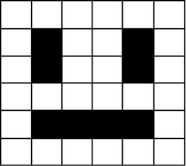
Images are stored in scan lines. Each line is encoded from left to right, top to bottom. The image here would receive the following binary values:
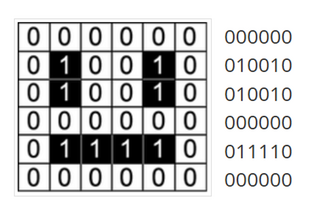
In order for the computer to interpret the image, the computer needs to know the following:
We call this extra piece of information “metadata”.
- Colour depth – how many bits represent each pixel
- Resolution - Width & Height (in pixels)
We call this extra piece of information “metadata”.
You may also be interested in:
Tags: Binary, binary resources, binary lessons