
Analog-to-Digital Sound Wave Simulator
Analog to Digital Converter (ADC) Simulator
Binary Output
Instructions
Instructions: Using the ADC Simulator
This simulator shows how computers convert smooth sound waves into binary using sampling and bit rate—just like an ADC in real life.
Step 1: Explore the Waveform
Step 2: Choose Your Settings
Step 3: Start Sampling
Step 4: View the Stepped Line
Step 5: Read the Binary Values
Step 6: Experiment
Questions to Explore
Instructions: Using the ADC Simulator
This simulator shows how computers convert smooth sound waves into binary using sampling and bit rate—just like an ADC in real life.
Step 1: Explore the Waveform
- Look at the smooth blue wave on the screen—this is a representation of an analogue sound wave.
- It changes over time, just like real sound.
Step 2: Choose Your Settings
- Use the sliders to adjust:
- Sample rate – how often the wave is measured.
- Bit depth – how many bits are used to record each sample.
Step 3: Start Sampling
- Click the "Sample Wave" button.
- The simulator will place red vertical lines at regular intervals along the wave.
- At each line, it measures the height (amplitude) of the wave.
Step 4: View the Stepped Line
- A red stepped line will appear, connecting the sampled values.
- This shows how the analogue wave is digitised—each step corresponds to a binary sample.
Step 5: Read the Binary Values
- Below each sample point, you’ll see a binary number.
- This number is the computer’s version of the wave’s height at that point.
Step 6: Experiment
- Try changing the sample rate and bit rate:
- A higher sample rate captures more detail.
- A higher bit depth makes each measurement more precise.
Questions to Explore
- How does the sampled waveform change when you reduce the sample rate?
- What happens to the binary values when you lower the bit depth?
- What kinds of wave shapes give simple binary patterns?
How it works
Sound travels in the form of a wave:
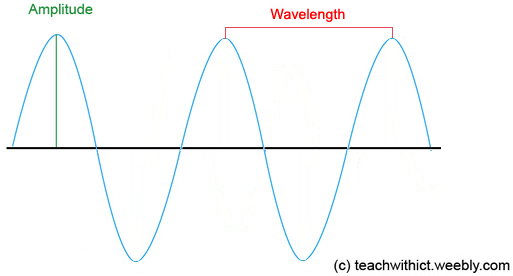
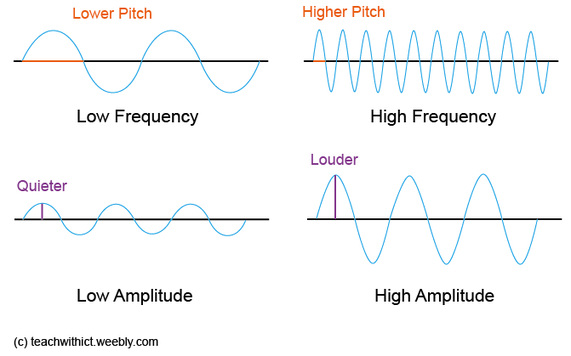
Amplitude controls how loud the sound is and the frequency controls the pitch. Example:
How is sound represented in binary?
Sound waves are analogue and therefore they need to be converted into binary in order for a computer to be able to process them. To do this, the computer must convert the waveform into a numerical representation so that the waveform can be stored digitally. For this, we use an Analogue-to-Digital Convertor (ADC).
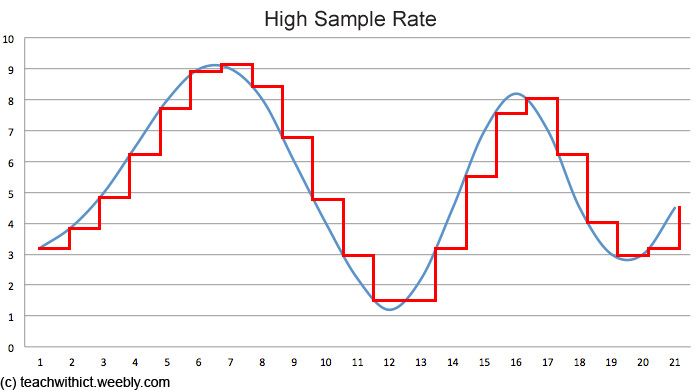
An ADC works by taking samples of the sound wave at regular intervals:
Sound waves are analogue and therefore they need to be converted into binary in order for a computer to be able to process them. To do this, the computer must convert the waveform into a numerical representation so that the waveform can be stored digitally. For this, we use an Analogue-to-Digital Convertor (ADC).
An ADC works by taking samples of the sound wave at regular intervals:
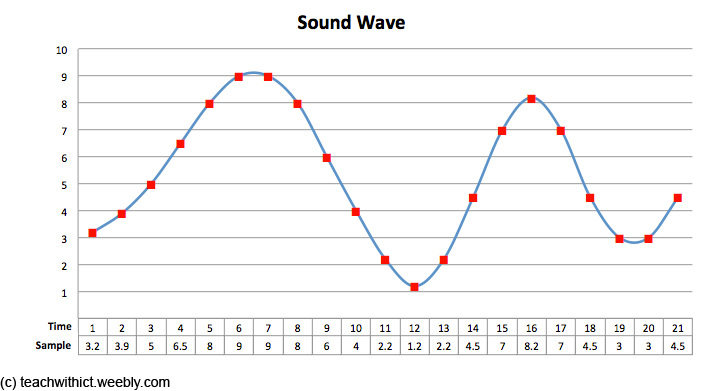
The effect of sample rate, duration and bit depth on the playback quality and size of a sound file
The quality and size of the file is affected by a number of factors - sample rate, duration and bit depth.
Sample rate
The sample rate refers to the number of samples taken every second and that the greater the frequency of the samples, the better the sound quality.
Bit depth
The bit depth refers to the number of bits used to store each sample. Just as with images, the more bits that are sampled, the better the accuracy of the sound but also the greater the file size. Typical bit depths are 16 bit and 24 bit.
The quality and size of the file is affected by a number of factors - sample rate, duration and bit depth.
Sample rate
The sample rate refers to the number of samples taken every second and that the greater the frequency of the samples, the better the sound quality.
Bit depth
The bit depth refers to the number of bits used to store each sample. Just as with images, the more bits that are sampled, the better the accuracy of the sound but also the greater the file size. Typical bit depths are 16 bit and 24 bit.
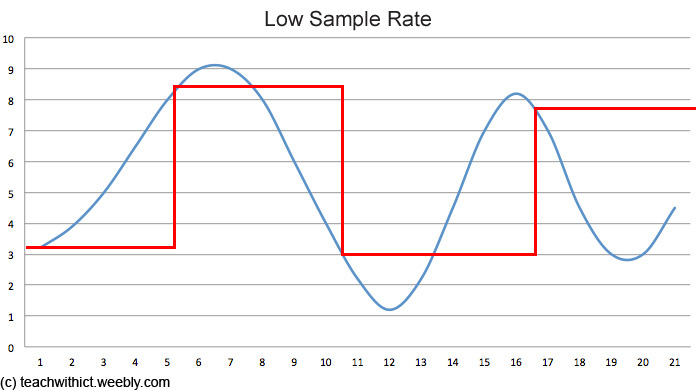
What is bit rate?
Bit rate is simply a measure of how much data is processed for each second of sound. Bit rate can be calculated by using the following equation:
Bit rate = sample rate × duration(s) x bit depth
As with sample rate, the higher the bit rate, the better quality of the sound.
Bit rate is simply a measure of how much data is processed for each second of sound. Bit rate can be calculated by using the following equation:
Bit rate = sample rate × duration(s) x bit depth
As with sample rate, the higher the bit rate, the better quality of the sound.
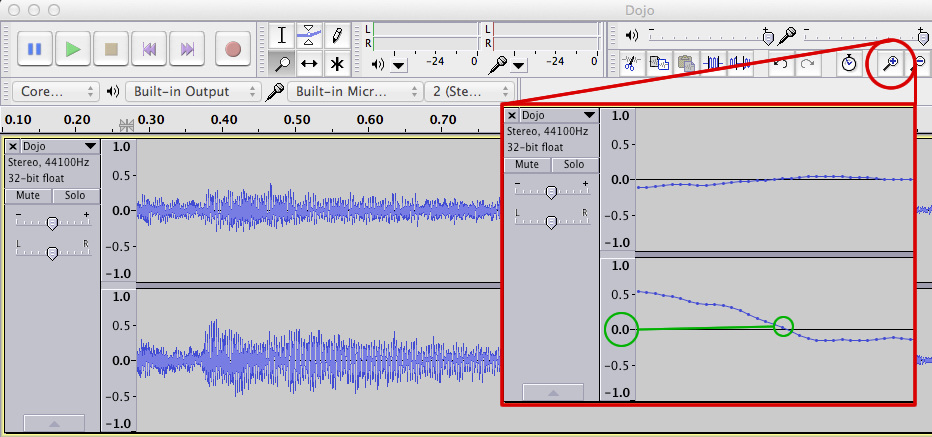
Below is an image taken from a sound editing program called Audacity. It shows the waveform of a real audio recording, represented as two curved blue lines — one for the left speaker and one for the right. These waveforms are actually just lots of little measurements of sound, taken very quickly one after another — in this case, 44,100 times every second (sample rate).
Frequently Asked Questions
Q1. What is sound in computing?
A1. Sound in computing refers to the digital representation of real-world sound waves. Since computers only understand binary, sound must be converted into a format they can process using 0s and 1s.
Q2. How is sound converted into binary?
A2. An Analogue-to-Digital Converter (ADC) takes regular measurements of the sound wave’s amplitude. Each measurement, called a sample, is then converted into a binary number and stored.
Q3. What is sample rate?
A3. Sample rate is the number of samples taken per second, measured in Hertz (Hz). A higher sample rate captures more detail and improves sound quality, but also increases file size.
Q4. What is bit depth?
A4. Bit depth is the number of bits used to store each sample. More bits allow for more precise amplitude values, improving accuracy but also increasing the size of the sound file.
Q5. What is bit rate and how is it calculated?
A5. Bit rate is the amount of data processed per second of sound. It is calculated by multiplying the sample rate by the bit depth. A higher bit rate results in better sound quality and larger files.
Q6. What affects the quality and size of a sound file?
A6. Both sample rate and bit depth affect quality and size. Higher values improve accuracy and fidelity but require more storage space.
Q7. What is compression and why is it used?
A7. Compression reduces the size of sound files. Lossless compression retains all data, while lossy compression removes some data to save space, which may reduce sound quality.
Q8. Can sound be converted back from binary?
A8. Yes. A Digital-to-Analogue Converter (DAC) reads the binary samples and reconstructs the original sound wave, allowing it to be played through speakers.
Q1. What is sound in computing?
A1. Sound in computing refers to the digital representation of real-world sound waves. Since computers only understand binary, sound must be converted into a format they can process using 0s and 1s.
Q2. How is sound converted into binary?
A2. An Analogue-to-Digital Converter (ADC) takes regular measurements of the sound wave’s amplitude. Each measurement, called a sample, is then converted into a binary number and stored.
Q3. What is sample rate?
A3. Sample rate is the number of samples taken per second, measured in Hertz (Hz). A higher sample rate captures more detail and improves sound quality, but also increases file size.
Q4. What is bit depth?
A4. Bit depth is the number of bits used to store each sample. More bits allow for more precise amplitude values, improving accuracy but also increasing the size of the sound file.
Q5. What is bit rate and how is it calculated?
A5. Bit rate is the amount of data processed per second of sound. It is calculated by multiplying the sample rate by the bit depth. A higher bit rate results in better sound quality and larger files.
Q6. What affects the quality and size of a sound file?
A6. Both sample rate and bit depth affect quality and size. Higher values improve accuracy and fidelity but require more storage space.
Q7. What is compression and why is it used?
A7. Compression reduces the size of sound files. Lossless compression retains all data, while lossy compression removes some data to save space, which may reduce sound quality.
Q8. Can sound be converted back from binary?
A8. Yes. A Digital-to-Analogue Converter (DAC) reads the binary samples and reconstructs the original sound wave, allowing it to be played through speakers.
Tags: Binary Representation, Binary Representation of Sound, Sound, MP3, WMV, WAV, encoding, Amplitude, Frequency, Pitch, Sample rate, Tags: GCSE, KS4, Theory, Computing Theory, CS Theory, Binary, Binary Representation, binary 2, binary conversion, how to do binary conversion, counting binary, binary number to decimal, binary 101, 8 binary, binary digits, binary digit, meaning of binary