
Programming theory - Flowcharts
Learning Objectives:
Suggested time: 50 mins
Starter
Start by showing students the following clip from an episode of the Big Bang Theory in which Sheldon shows his friendship algorithm in the form of a flowchart. (Thanks to Phil Smith for suggesting this one via CAS)
- Understand algorithms (written in pseudocode or flow diagram), explain what they do, and correct or complete them
- Produce algorithms in pseudocode or flow diagrams to solve problems
Suggested time: 50 mins
Starter
Start by showing students the following clip from an episode of the Big Bang Theory in which Sheldon shows his friendship algorithm in the form of a flowchart. (Thanks to Phil Smith for suggesting this one via CAS)
The Big Bang Theory - The friendship algorithm
Alternative starter (If you don't have access to YouTube)
Making the tea starter - Unplugged
This is a starter activity I use to introduce algorithms. Print and cut out the attached instructions for making a cup of tea. Instruct students to put the instructions in the correct order. The “Making the Tea” exercise has been doing the rounds for sometime. I remember doing it at college back in the early 90’s. What I find interesting is seeing all the different variations for such as simple task.
Making the tea starter - Unplugged
This is a starter activity I use to introduce algorithms. Print and cut out the attached instructions for making a cup of tea. Instruct students to put the instructions in the correct order. The “Making the Tea” exercise has been doing the rounds for sometime. I remember doing it at college back in the early 90’s. What I find interesting is seeing all the different variations for such as simple task.

| making_the_tea_print.docx |
| making_the_tea_task.docx |
| making_the_tea_solution.docx |
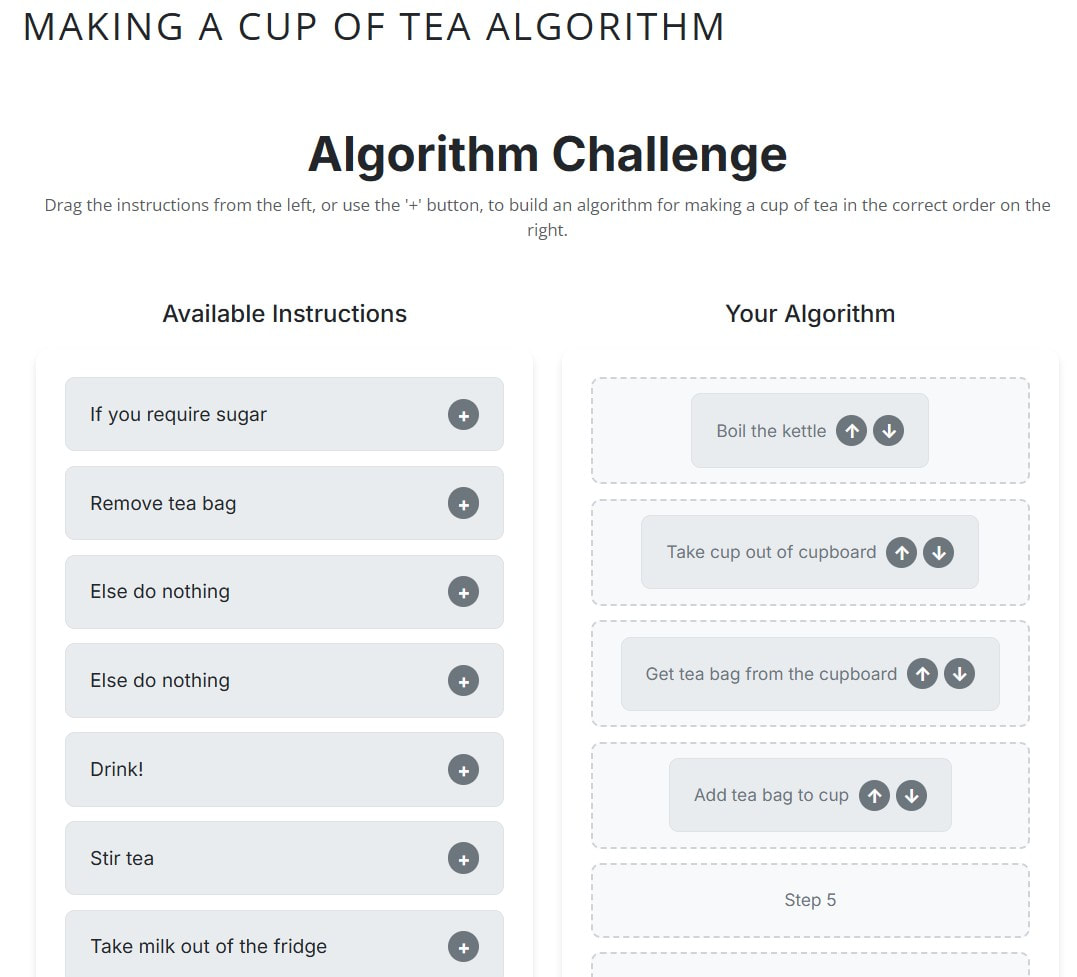
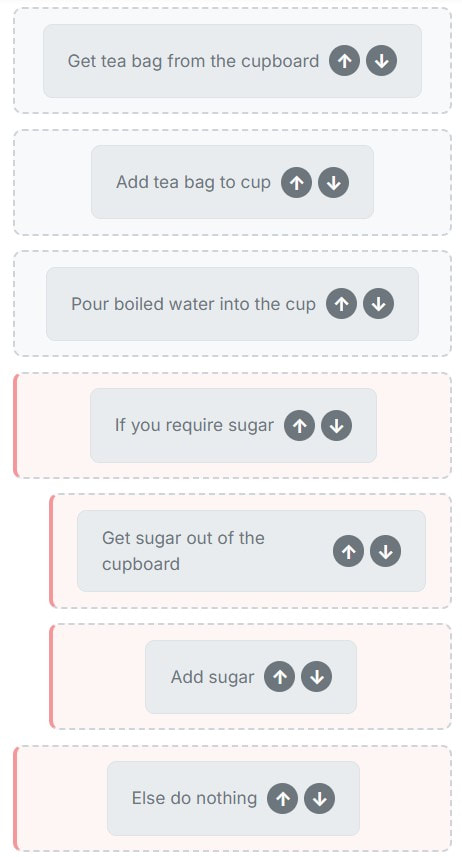
Making the tea starter - Digital
Click here for a digital version of the 'making the tea starter'.
|
|
Ask students to compare their algorithm, for making a cup of tea, with a neighbour and discuss any subtle differences.
Extension task: If your students are feeling really confident, you could challenge them to create a BS 6008 compliant algorithm for making the tea!
Extension task: If your students are feeling really confident, you could challenge them to create a BS 6008 compliant algorithm for making the tea!
Introduction:
Explain that an algorithm is simply a sequence of steps for completing a task. Also explain that algorithms can be represented in many ways, the most commonly used being flow charts and pseudocode.
Follow this by going through an example on the board (see below).
Explain that an algorithm is simply a sequence of steps for completing a task. Also explain that algorithms can be represented in many ways, the most commonly used being flow charts and pseudocode.
Follow this by going through an example on the board (see below).
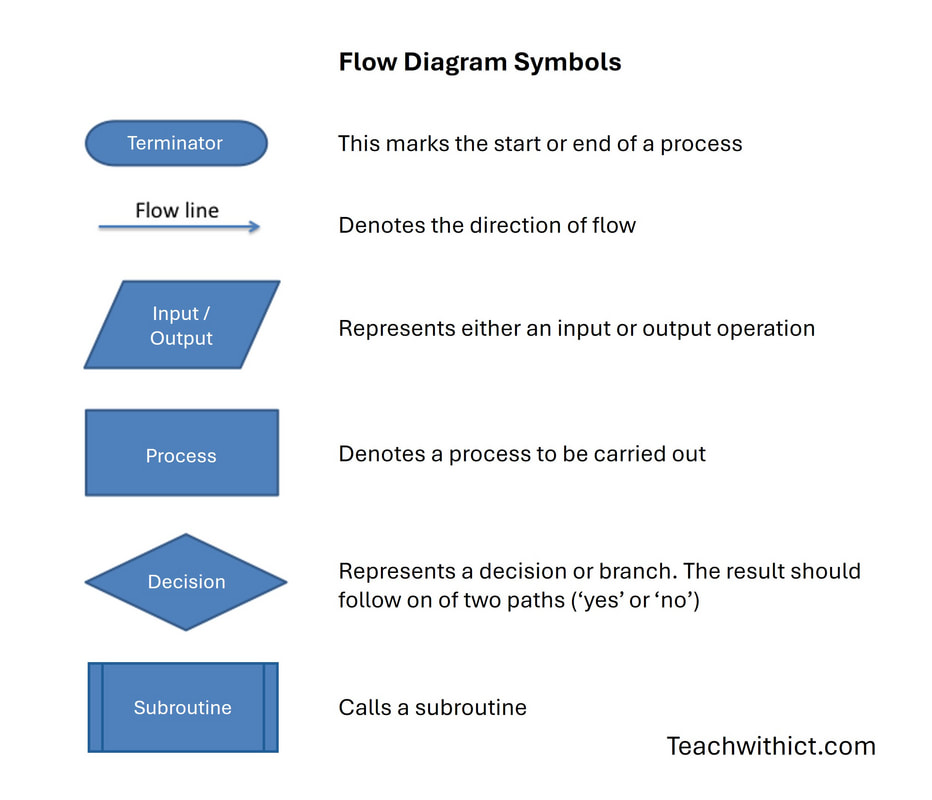
Commonly used flow diagram (or flowchart) symbols.
Explain that a flow diagram (also called a flowchart) is a simple picture that shows the steps in a program. It uses special shapes, called symbols, to show different types of instructions. These symbols are joined together to show the order of steps and how to solve the problem.
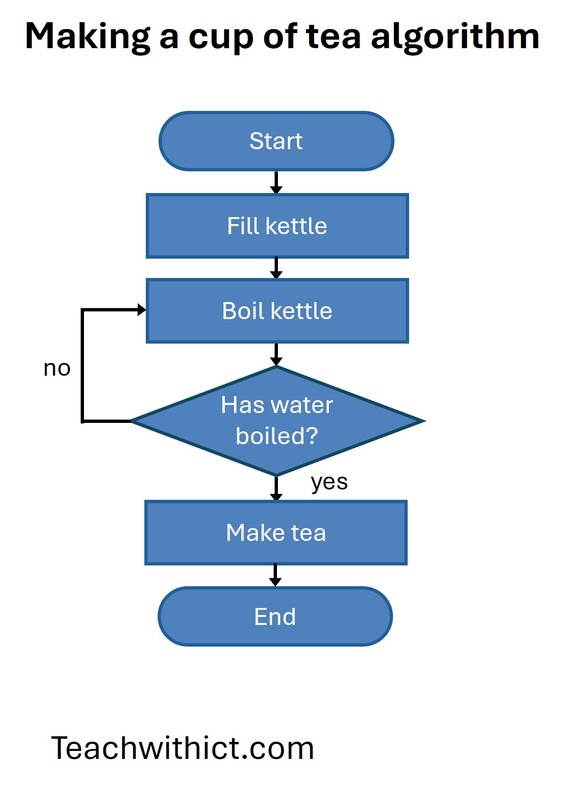
Next, display the following example for making a cup of tea. Inform students that flow diagrams can be used to plan out programs. Walk through the 'making the tea' example with class. Ask the students to suggests ways they might improve the algorithm.
Next, display the following example for making a cup of tea. Inform students that flow diagrams can be used to plan out programs. Walk through the 'making the tea' example with class. Ask the students to suggests ways they might improve the algorithm.
Activity 1: (Interactive Challenge)
Direct students to teachwithict.com/flow-diagram.html
In the first matching exercise, students must match the flowchart symbols to their names. In the second exercise, students are challenged to complete a given flowchart by placing the events in the correct order.
Direct students to teachwithict.com/flow-diagram.html
In the first matching exercise, students must match the flowchart symbols to their names. In the second exercise, students are challenged to complete a given flowchart by placing the events in the correct order.
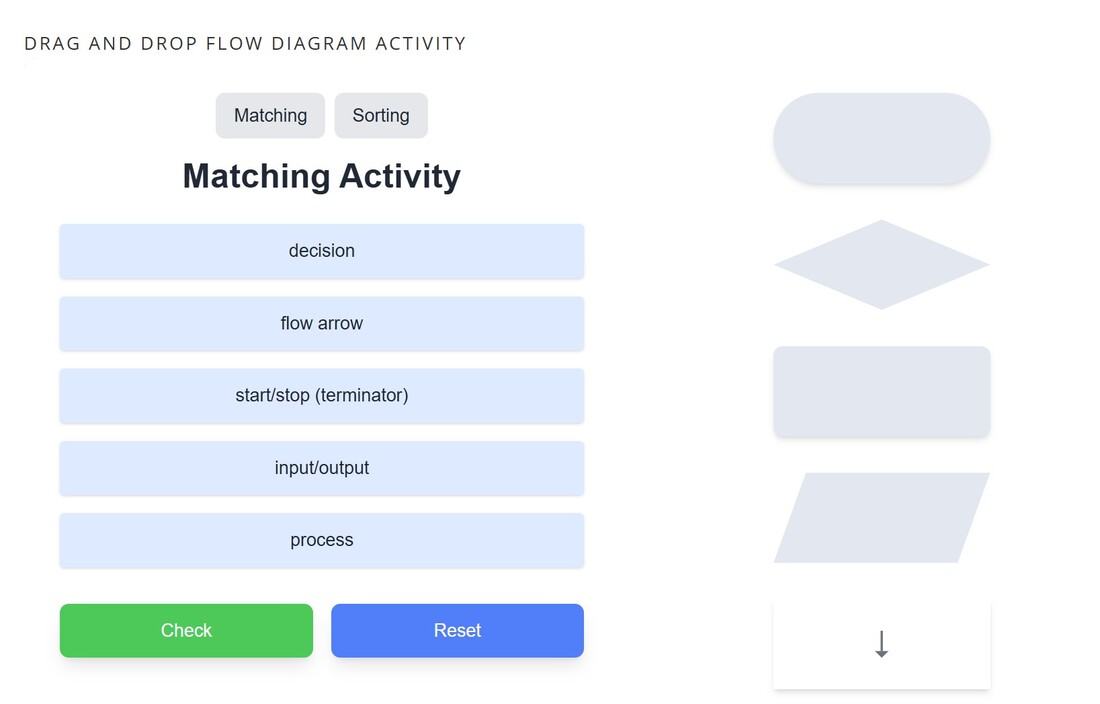
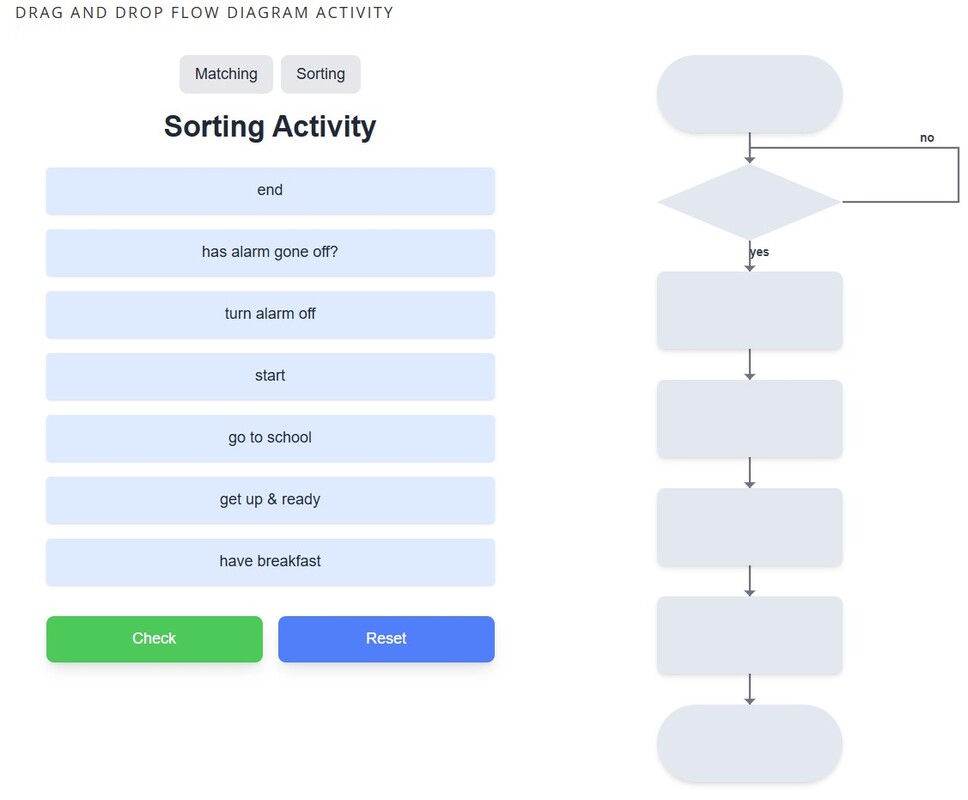
With input from the students, go through the solution to the second matching exercise - “going to school”. Next, ask students to suggest what daily routines are missing from the example.
Place students into small groups and ask them to improve the algorithm for getting up and going to school in the morning (in the form of a flowchart).
Teaching tip: You can get the students to write down any algorithm (e.g. making the tea, tying a shoelace, making a jam sandwich etc.) however, I find, the more complex the algorithm, the easier it is to explain the need for sub-routines later in the lesson. The going to school algorithm is great for demonstrating this as you can have several sub-routines for brushing your teeth, taking a shower, making breakfast etc. Also, try to encourage your students to make their algorithms as detailed as possible - this will also help with explaining the need for sub-routines later.
Note: Not all students may relate to / feel comfortable with the example of getting ready for school, so I’ve included a selection of alternative scenarios at the end of the lesson plan to ensure everyone can engage meaningfully with the activity.
Place students into small groups and ask them to improve the algorithm for getting up and going to school in the morning (in the form of a flowchart).
Teaching tip: You can get the students to write down any algorithm (e.g. making the tea, tying a shoelace, making a jam sandwich etc.) however, I find, the more complex the algorithm, the easier it is to explain the need for sub-routines later in the lesson. The going to school algorithm is great for demonstrating this as you can have several sub-routines for brushing your teeth, taking a shower, making breakfast etc. Also, try to encourage your students to make their algorithms as detailed as possible - this will also help with explaining the need for sub-routines later.
Note: Not all students may relate to / feel comfortable with the example of getting ready for school, so I’ve included a selection of alternative scenarios at the end of the lesson plan to ensure everyone can engage meaningfully with the activity.
Introducing subroutines
Share the following example flow diagram and ask students to identify any missing answers. Draw out answers such 'turn on/off tap', 'remove lid from toothpaste etc.'.
Share the following example flow diagram and ask students to identify any missing answers. Draw out answers such 'turn on/off tap', 'remove lid from toothpaste etc.'.
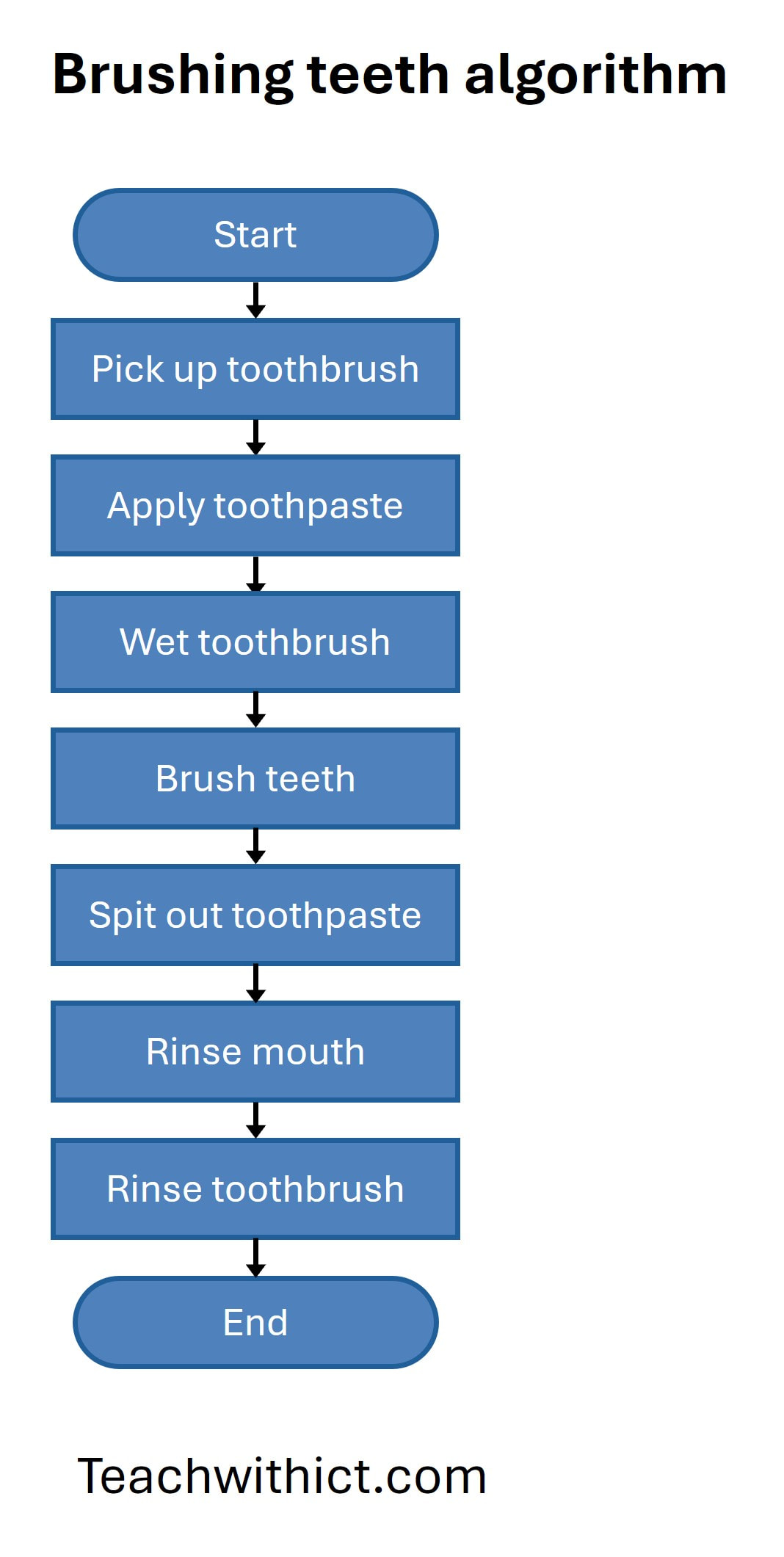
Next, share a more detailed flow diagram for brushing your teeth.
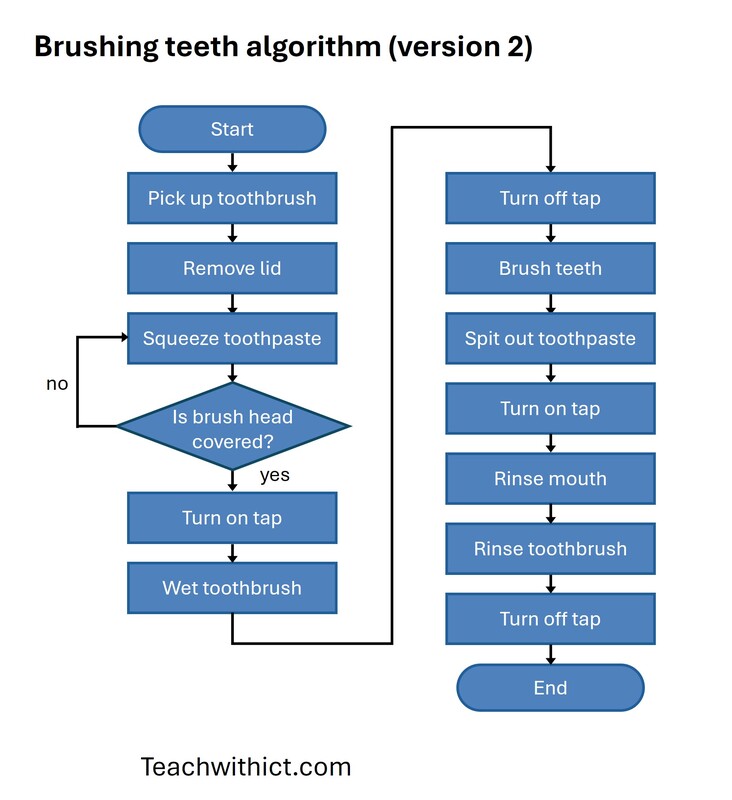
Next, ask students to explain how they would turn/off on the tap. Draw out as much detail as possible e.g., 'Turn tap clockwise until water is flowing' 'Turn tap 45 degrees' etc. Share the following example flow diagram for turning on a tap (left image) and what it might look like in our 'brushing your teeth' algorithm (right image).
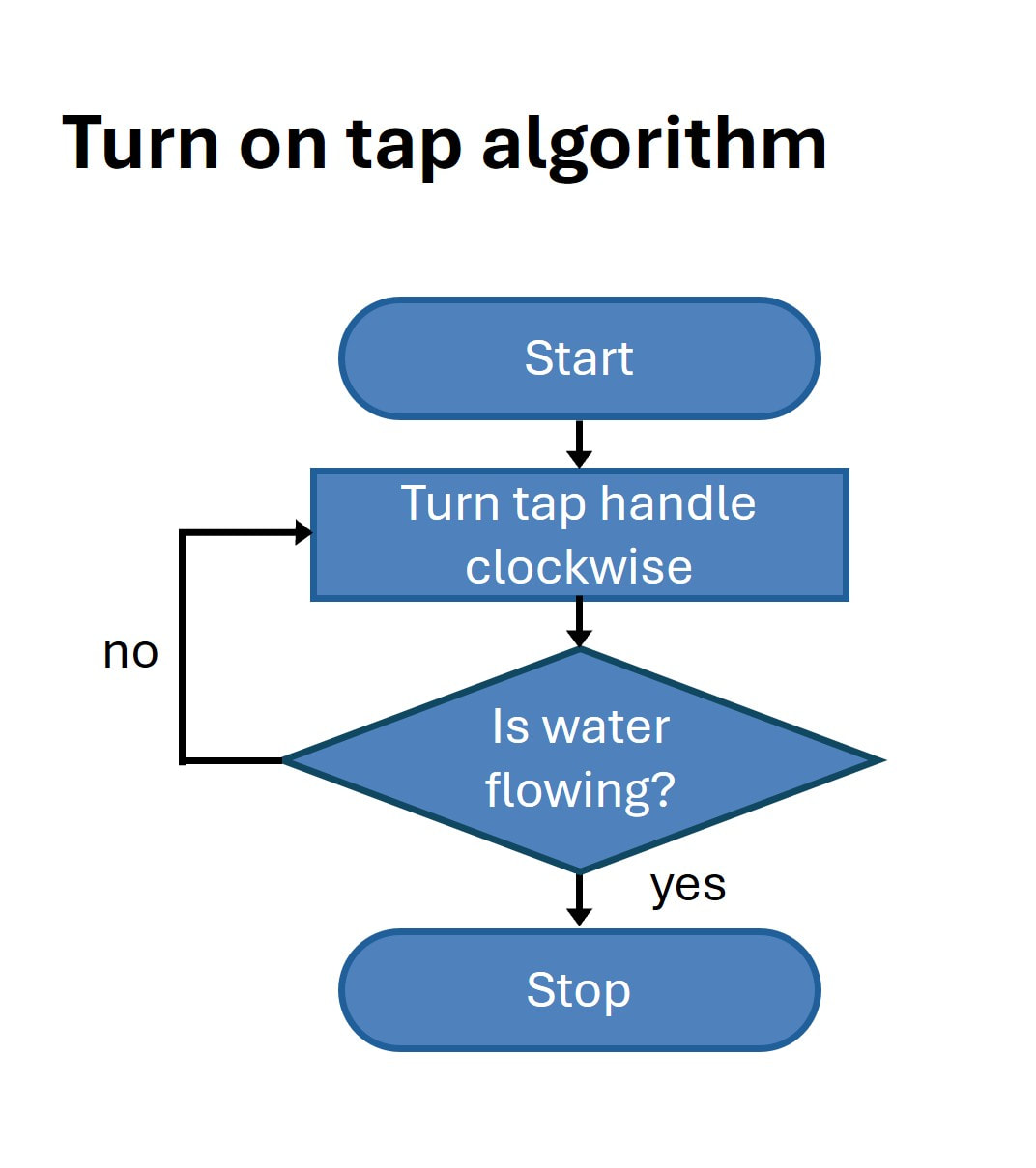
|
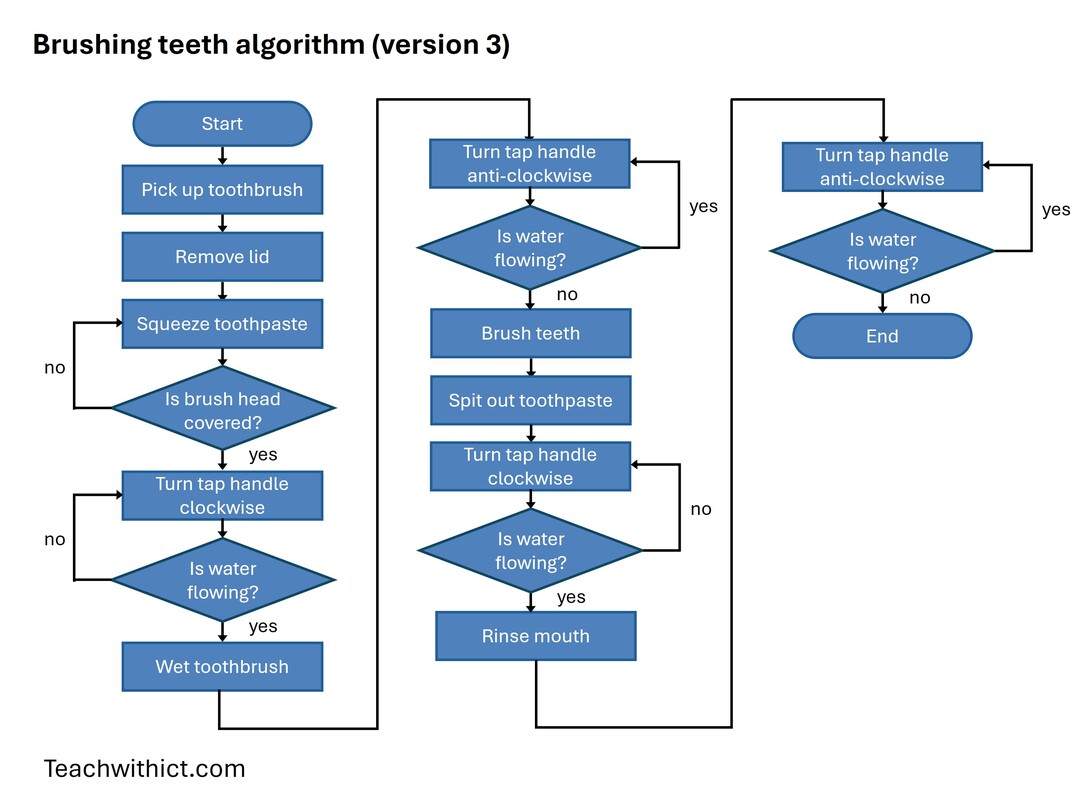
|
Ask the students to suggest what is wrong with the new flow diagram for brushing teeth. Draw out answers such as: 'Difficult to understand', 'too much repetition'. Ask the students to suggest how we might improve the diagram? Draw out answers such as 'Have a separate program for turning on/off the tap' and 'break the diagram into chunks' etc.
Share the following flow symbol. Explain the a subroutine is a set of instructions that performs a specific task and can be used multiple times within a program or process. Inform the students that, in a flow diagram, a subroutine is shown as a special box (usually with double lines on the sides).
Share the following flow symbol. Explain the a subroutine is a set of instructions that performs a specific task and can be used multiple times within a program or process. Inform the students that, in a flow diagram, a subroutine is shown as a special box (usually with double lines on the sides).
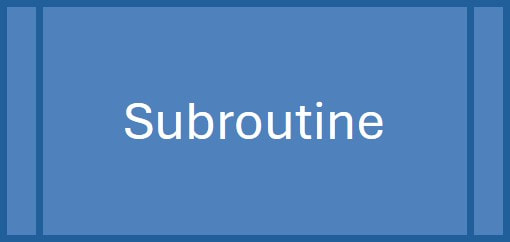
Now share the updated flow diagram for brushing teeth, using subroutines.
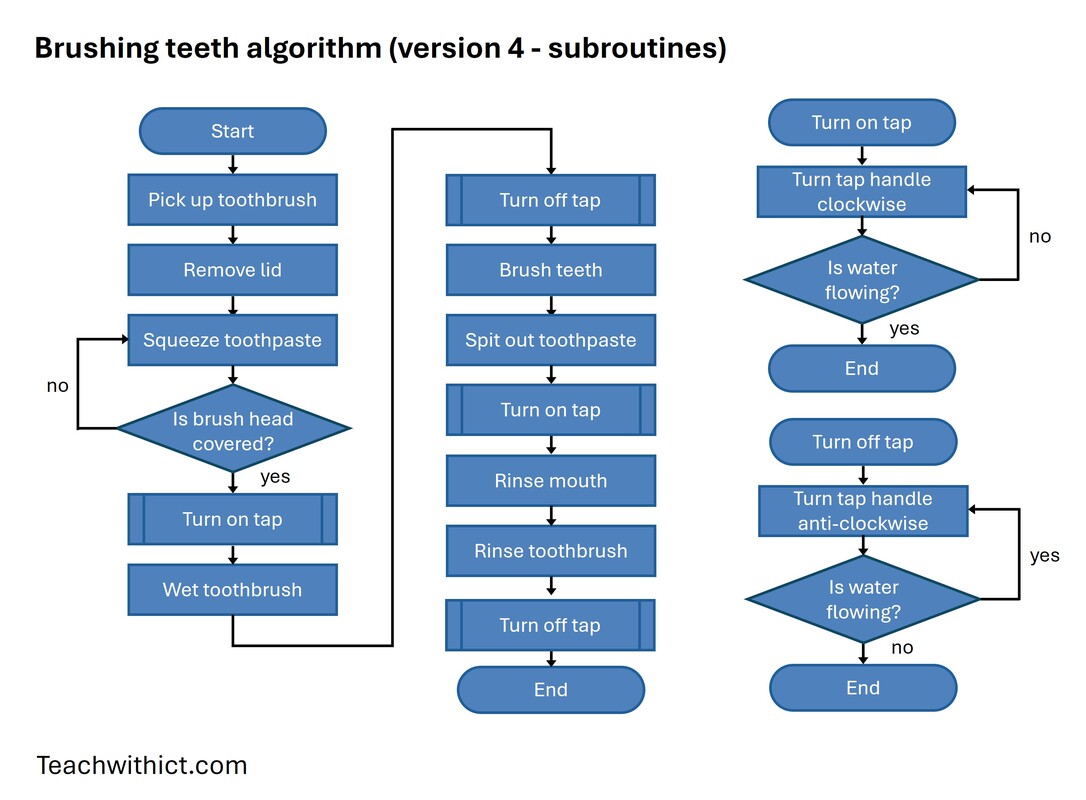
Ask the students to suggest the possible benefits of using subroutines and wait for answers such as “easier to understand” and “several people can work on the same algorithm at the same time”.
Explain the benefits of using subroutines:
Finish by asking the students to modify their own flow diagrams to include at least one sub-routine.
Explain the benefits of using subroutines:
- Reusability: You can use the same set of steps in different parts of the diagram.
- Clarity: It keeps the diagram clean and easy to follow.
- Efficiency: Makes it easier to update or fix one part without changing everything.
Finish by asking the students to modify their own flow diagrams to include at least one sub-routine.
Plenary
Ask for volunteers to share their flow diagram. Ask the class how they could improve their algorithms.
Exit ticket
1. What are the advantages/benefits of using flow diagrams?
2. What are disadvantages/drawbacks of using flow diagrams?
Answers:
Benefits:
Drawbacks:
Ask for volunteers to share their flow diagram. Ask the class how they could improve their algorithms.
Exit ticket
1. What are the advantages/benefits of using flow diagrams?
2. What are disadvantages/drawbacks of using flow diagrams?
Answers:
Benefits:
- It is easy to see how a program flows.
- Flow diagrams follow an international standard.
Drawbacks:
- With large/more complex programs, the diagrams can become huge in size and difficult to follow.
- Any significant changes to the design may mean the diagram has to be completely redrawn.
Useful resources:
The friendship algorithm - Clip from an episode of the Big Bang Theory in which Sheldon shows his friendship algorithm in the form of a flowchart.
BBC Byte Size (System Flowcharts)
Algorithms in pseudocode and flow diagrams - Lesson plan on algorithms in pseudocode and flow diagrams.
The friendship algorithm - Clip from an episode of the Big Bang Theory in which Sheldon shows his friendship algorithm in the form of a flowchart.
BBC Byte Size (System Flowcharts)
Algorithms in pseudocode and flow diagrams - Lesson plan on algorithms in pseudocode and flow diagrams.
Teaching tips:
Gamify the activity by acting out the students' instructions literally and pedantically. This turns the activity into a fun game while reinforcing the need for precision in algorithms.
Example: Turning on a Tap
Student: “Turn on the tap.”
Teacher (confused): “But I don’t know how. Do I push it? Pull it? Flick it?”
Student: “Turn it anti-clockwise.”
Teacher (barely moves hand): “I turned it a tiny bit. No water is coming out.”
Student: “Keep turning!”
Teacher (turns quickly): “Ahh! Now the water is blasting out and splashing everywhere!”
Gamify the activity by acting out the students' instructions literally and pedantically. This turns the activity into a fun game while reinforcing the need for precision in algorithms.
Example: Turning on a Tap
Student: “Turn on the tap.”
Teacher (confused): “But I don’t know how. Do I push it? Pull it? Flick it?”
Student: “Turn it anti-clockwise.”
Teacher (barely moves hand): “I turned it a tiny bit. No water is coming out.”
Student: “Keep turning!”
Teacher (turns quickly): “Ahh! Now the water is blasting out and splashing everywhere!”
Alternative activities / taking it further:
There are several ways in which you can introduce flowcharts. Here are some alternatives to the ones I suggested:
Jam Sandwich activity.
In this exercise, students are asked to create an algorithm from set commands to program their teacher (sandwich bot) to make a jam sandwich. Students must write a set of working instructions, using commands such as Pick Up and Put Down, which their teacher has to follow precisely in order to make a jam sandwich. This task can be easily adapted to incorporate flowcharts and is great for introducing algorithms (at any age)! To find out more, check out this lesson plan, courtesy of Phil Bagge, CAS Primary Master Teacher (@baggiepr): Jam Sandwich Algorithm (programming teacher bot)
Alternative Flow Chart Scenarios:
There are several ways in which you can introduce flowcharts. Here are some alternatives to the ones I suggested:
Jam Sandwich activity.
In this exercise, students are asked to create an algorithm from set commands to program their teacher (sandwich bot) to make a jam sandwich. Students must write a set of working instructions, using commands such as Pick Up and Put Down, which their teacher has to follow precisely in order to make a jam sandwich. This task can be easily adapted to incorporate flowcharts and is great for introducing algorithms (at any age)! To find out more, check out this lesson plan, courtesy of Phil Bagge, CAS Primary Master Teacher (@baggiepr): Jam Sandwich Algorithm (programming teacher bot)
Alternative Flow Chart Scenarios:
- Getting ready for bed
- Choosing what clothes to wear
- Choosing what to watch on TV or YouTube
- Feeding a pet
- Playing a game
- Drawing a monster using regular polygon shapes
Tags: GCSE Computer Science, Algorithms, Pseudocode, Computing