teachComputing
  • Home
  • AI
    • AI Literacy >
      • AI Alliteration
      • Describing Monsters
      • Dystopian writing
      • Bringing literacy to life with AI
      • AI Literacy Prompts
    • AI Computing >
      • AI Computing Lessons >
        • Fake News
        • Make me happy
        • Chatting Robot
        • Supervised Learning
        • Fooled
        • Socratic Debate
        • Moral Machine
        • Invisible Animals
      • AI Coding Strategies
      • AI Computing Prompts
    • AI Prompts
  • Teaching & Learning
    • Wellbeing
    • Blog
    • Humour >
      • Teacher Humour
      • Teacher Humor
    • PLN Challenge >
      • Covering your backside
      • Online Privacy
      • Twitter Challenge >
        • Twitter All Star
        • Challenge 1
        • Challenge 2
        • Challenge 3
        • Tips for staying safe on Twitter
        • Tips for hosting Edu Twitter Chats
        • Tips for taking part in Twitter chats
        • It's all about the hashtag! Essential chats for educators
        • How to storify a chat
        • How to schedule Tweets
        • Twitter Lists
        • NT2tEU
      • Facebook Challenge >
        • Challenge 4
        • Challenge 5
        • Challenge 6
        • Tips for staying safe on Facebook
      • Google Challenge >
        • Challenge 7
        • Challenge 8
        • Challenge 9
      • Pinterest Challenge >
        • Challenge 10
        • Challenge 11
        • Challenge 12
        • Tips for using Pinterest
      • Blog Challenge >
        • Challenge 13
        • Challenge 14
        • Challenge 15
        • How to create a classroom blog
      • Staffrm Challenge >
        • Challenge 16
        • Challenge 17
        • Challenge 18
      • Skype Challenge >
        • Challenge 19
        • Challenge 20
        • Challenge 21
      • Edmodo Challenge >
        • Challenge 22
        • Challenge 23
        • Challenge 24
      • TeachMeet Challenge >
        • Challenge 25
        • Challenge 26
        • Challenge 27
      • In-school challenge >
        • Challenge 28
        • Challenge 29
        • Challenge 30
      • 30 ways to grow your PLN
    • Tools for Teachers >
      • Web 2.0 >
        • Top 10 Web 2.0 Tools
        • Classroom Response Tools
      • Quiz Tools
      • Classroom Management Tools
      • Software >
        • Media Conversion Tools
        • Application Software
      • Multimedia >
        • Free Music
    • BYOD
    • Digital Leaders >
      • Digital Leaders Blog >
        • DL Archive
      • DL Tips
      • Quotes
      • Links
    • Flipped Learning >
      • Flipped Classroom vs. Blended Classroom
    • Gamification >
      • Gamification vs. Game Based Learning vs. Game Design
    • School Closures
    • Game Based Learning >
      • Minecraft >
        • Minecraft in Education
        • Minecraft Lesson Ideas
        • Minecraft Literacy
        • Real Life Minecraft
        • Minecraft Top Tips
        • Minecraft Coding Tutorials >
          • Minecraft Code Builder Setup
          • Minecraft Code: Walking on Air
          • Minecraft Code: Hello World
          • Minecraft Code: Functions
          • Minecraft Code: Rainbow
          • Minecraft Code: Skyscraper
          • Minecraft Pixel Art >
            • MC Pixel Art Painter
    • The magic of >
      • The magic of Computing
      • The magic of Maths
      • The magic of Science
      • The magic of Literacy
    • Road2e2
    • T&L Blog
  • Computing
    • Computing Blog >
      • GCSE Computer Science
      • General
    • Teaching Computer Science >
      • CPD >
        • Blocks to Code
        • Tutorials >
          • How to embed Flash into PowerPoint
          • How to embed YouTube videos in to PowerPoint
          • How to create a wiki
          • How to create a classroom blog
      • Schemes of Work
      • Programming Resources
      • Theory
      • Posters >
        • Binary Posters
        • Coding Posters
      • Festive Computing Activities
      • FLOPPYS 2020
      • FLOPPYS 2021
      • FLOPPYS 2022
      • Game Design
      • App Creation
    • Theory Lessons >
      • Theory Tests
      • Computer Hardware >
        • Input / Output
        • CPU
        • LMC
        • Storage Devices
        • Memory (RAM / ROM)
        • Hardware
      • Binary Lessons >
        • Units of Data
        • Binary & Denary >
          • Binary & Denary (Festive)
        • Binary Representation of Images >
          • Binary Representation of Images (Festive)
          • Pixel Painter
        • Binary Representation of Characters
        • Binary Representation of Sound >
          • ADC Simulator
        • Binary Representation of Instructions
        • Binary Addition
        • Hexadecimal
      • Software >
        • Operating System
        • Types of Software
        • Utility Software
      • Programming >
        • Flowcharts >
          • Tea Algorithm
          • Flow diagrams
      • Computational Thinking >
        • Data Science
    • Digital Literacy >
      • Social Media (Good or Bad thing?)
      • Cyberbullying
      • Staying Safe Online
    • Games >
      • Binary Games >
        • Binary Blitz!
        • Binary Brainiac
        • Binary Blaster
        • Binary Blast Off
        • Binary Flip
    • Binary >
      • ASCII Converter
      • Binary to Decimal
      • Binary to Hex
      • Binary Calculator
    • Escape Rooms >
      • Breakout Edu
      • Escape Timers >
        • Escape Timer
        • Team Timer
        • Binary Timer
      • Binary Escape
    • ICT Strand >
      • Fake News Project >
        • Fake News 1
        • Fake News 2
        • Fake News 3
        • Fake News 4
        • Fake News 5
      • Spreadsheet Modelling
      • Superhero Movie Trailer
      • PowerPoint Task
      • Digital Imaging
      • Paint 3D Tutorial
    • CS Toolkit >
      • AI Toolkit
      • Binary Toolkit
      • Coding Toolkit
    • Coding Strategies >
      • Worked Examples
      • Code Tracing
      • Parsons Problems
      • PRIMM
    • Programming Lessons >
      • Scratch >
        • Festive Scratch >
          • Music Festive with Scratch
          • Turtle Snowflakes
          • What's your elf name
          • Secret Santa
        • Making music with Scratch
        • Sorting Hat Lesson
        • Turtle Time
        • Superhero name generator
        • Compliment Generator
        • Magic 8 ball
      • Python >
        • Chatbot
        • Coding Golf
        • Turtle Time >
          • Turtle Instructions
        • Magic 8 ball
        • Python Mad Libs
        • Rock Paper Scissors
        • Shakespearean Insult Generator >
          • Shakespearean Insult Generator Part 2
        • Compliment generator
        • Sorting Hat
        • Superhero name generator
        • Cards Against
        • Guess the word
        • Guess the number
        • Festive Python >
          • What's your elf name
          • Secret Santa
          • Turtle Snowflakes
          • Let It Snow
      • Little Man Computer
      • Hour of Code >
        • Hour of Code Music
        • Python Tutorials
        • HoC 8-Bit Challenge
        • Music MicroPython (Festive)
      • Raspberry Pi >
        • Networking the Pi
        • Minecraft Pi
        • Harry Potter Sorting Hat >
          • Harry Potter Sorting Hat (GPIO)
        • Raspberry Pi LTSP (Networked Classroom)
        • Astro Pi
    • Homeschooling
    • Remote Learning >
      • Fun Python Tutorials
      • Python Tutorials >
        • Chatbot Tutorial
        • Dice Roll
        • Turtle Tutorial
        • Magic 8 ball
        • Sorting Hat
        • Rock Paper Scissors Tutorial
        • Cards Against
        • Python Mad Libs
        • Shakespearean Insult Generator >
          • Shakespearean Insult Generator Part 2
        • Guess the word
        • Guess the number
        • Superhero name generator
        • Compliment generator
        • Festive Python Tutorials >
          • What's your elf name
          • Secret Santa
          • Turtle Snowflakes
      • Scratch Tutorials >
        • Sorting Hat
        • What's your superhero name
        • Turtle Time Tutorial
        • Compliment Generator
        • Magic 8 Ball
        • Festive Scratch Tutorials >
          • Festive Music with Scratch
          • Secret Santa Scratch Tutorial
          • Turtle Snowflakes Tutorial
          • What's your elf name
    • Revision >
      • Data Representation >
        • Binary Representation of Images
        • Binary Representation of Sound
  • 21 Things
    • 21 Things To Try >
      • ConnectEd
      • Social Media >
        • Twitter
        • Pinterest
        • Facebook Groups
        • Facebook Pages
        • Google+ Communities
        • Staffrm
        • Edmodo
        • Mystery Skype
        • Blogging
        • Classroom Blogging
      • Gamification
      • Flipped Classroom
      • Breakout Edu
      • Edu Podcasts
      • Jar of Awesome
      • TeachMeet
      • Team Teaching
      • Mixed Reality
      • Digital Leaders
      • Genius Hour
      • Sketchnoting
    • Computing >
      • CS 20
      • Code Golf
      • PRIMM
      • Under The Hood
      • Unplugged
      • Podcasts
      • Facebook Groups CS
      • Flipped Classroom CS
      • Teach with Magic
      • Socratic Debate
      • Coding Music
    • 21 Things Keep Fit >
      • 20 Health Hacks
      • Home Health Hacks
    • 21 Things PLN >
      • Edmodo
      • Twitter
      • Reply to a blog
      • Skype
      • Cofee Edu
      • Pinterest
      • Reach out
      • Conferences
      • Instagram
      • Ning
      • MEC
      • Voxer
      • LinkedIn
  • Microbit
    • Physical Computing >
      • micro:bit LEDs
      • micro:bit PIR
      • micro:bit Servo
      • micro:bit Temp
      • micro:bit LDR
      • micro:bit Moisture
      • micro:bit RGB LEDs
      • micro:bit HC-SR04 3v3
      • micro:bit HC-SR04 5v
      • micro:bit Push button
      • micro:bit Potentiometer
      • micro:bit Piezo
    • Music >
      • Music Festive
    • Festive Projects
    • Projects >
      • Music
      • Music MicroPython
      • Servo Animals
    • Lessons >
      • Magic 8 Ball
      • Harry Potter Sorting Hat
    • Quick Start Guide
    • Microbit Simulator
  • #100 Ideas
    • Testimonials
    • Competition >
      • Competition 2
    • Worksheets
    • Bonus Ideas >
      • What's your elf name
      • Make me happy
      • Guess the word
      • Cards Against Humanities
      • Compliment generator
      • Data Science
    • Curriculum
    • ISTE
    • CSTA
  • About
    • Privacy

Binary Lessons

Binary Representation of Sound
Soundwave
In this lesson, students explore how sound is represented in a  computer system.

​In this lesson, students explore how sound is represented in a 
 computer system
.
Learning Objectives:
​
  • Explain how sound can be sampled and stored in digital form
  • Explain how sampling intervals and other considerations affect the size of a sound file and the quality of its playback
  • Online tutoring services

Suggested time: 50 mins

Curriculum Mapping:

KS3 Computing:

  • Understand how data of various types (including sounds) can be represented and manipulated digitally, in the form of binary digits → Students learn how sound is sampled and stored using binary, including concepts like sample rate, bit depth, and duration.
  • Understand how instructions are stored and executed within a computer system → Explains how sound data is processed and played back by hardware components.
  • Use logical reasoning to compare the utility of alternative algorithms for the same problem → Students explore trade-offs between sound quality and file size based on sampling parameters.

Data and Computational Thinking:

  • Data and information literacy → Students calculate sound file sizes and understand how digital sound is structured.

Citizenship:

  • Managing online information, copyright and ownership → Lessons include ethical considerations around sound editing and digital content use.
  • 1.3 Knowledge Constructor → Students evaluate how sound is represented digitally and compare formats based on quality and size.
  • 1.5 Computational Thinker → Students break down sound into samples and bits, and model how changes affect playback.
  • 1.6 Creative Communicator → Students use sound editing tools to manipulate audio and express ideas.

Algorithms and Programming (AP):

  • 2-AP-11: Create programs that use variables to store and modify data → Students use variables to represent sample rate, bit depth, and duration in calculations.

Data and Analysis (DA):

  • 2-DA-07: Represent data in multiple ways → Sound is represented as binary sequences and visualised through waveforms.

Impacts of Computing (IC):

  • 3A-IC-11: Social and economic implications of digital privacy → Ethical use of sound recordings and copyright issues are discussed.
  • MS-ETS1-1: Define criteria and constraints of a design problem → Students balance sound quality vs. file size when designing digital audio.
  • Science Practices: Analysing and interpreting data → Students analyse how sampling parameters affect sound fidelity and storage.
  • Crosscutting Concepts: Systems and system models → Sound representation is modelled as a system of binary samples.
  • RI.6.8: Evaluate arguments and claims → Students assess trade-offs in sound quality and compression.
  • W.8.1: Write arguments with evidence → Students justify choices in sound encoding based on technical and ethical considerations.
  • SL.7.1: Engage in collaborative discussions → Group activities around sound editing and representation foster discussion and peer learning.


​Starter:

​
Start the lesson by playing two samples of the same track (‪Tenacious D - Tribute “The Best Song In The World”), each compressed at different sample rates (See below). After playing the two samples, ask the students what they notice about the two tracks.

  • 44100 sample rate.wav 
  • 8000 sample rate.wav 

(Source: PWNICT: (https://www.pwnict.co.uk/computingGCSE/computingResources.html) 


Theory:

Next, explain that, in the previous lessons, the students looked at how numbers and pictures etc. are stored in a computer using binary and that in this lesson they will explore how a computer stores sound.

Explain that sound travels as a wave and show students the following example:
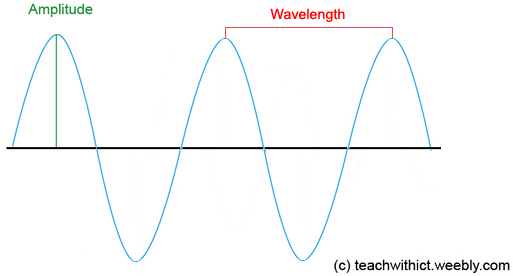
Graph showing a wave with labels for amplitude (height) and wavelength (distance between peaks).
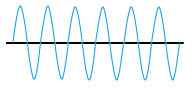
Next, explain that amplitude controls how loud the sound is and the frequency controls the pitch. Display the following example on the board:
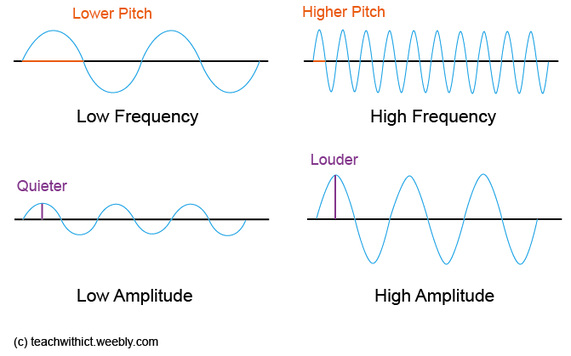
Four pairs of waveforms showing differences in pitch, frequency, volume, and amplitude.
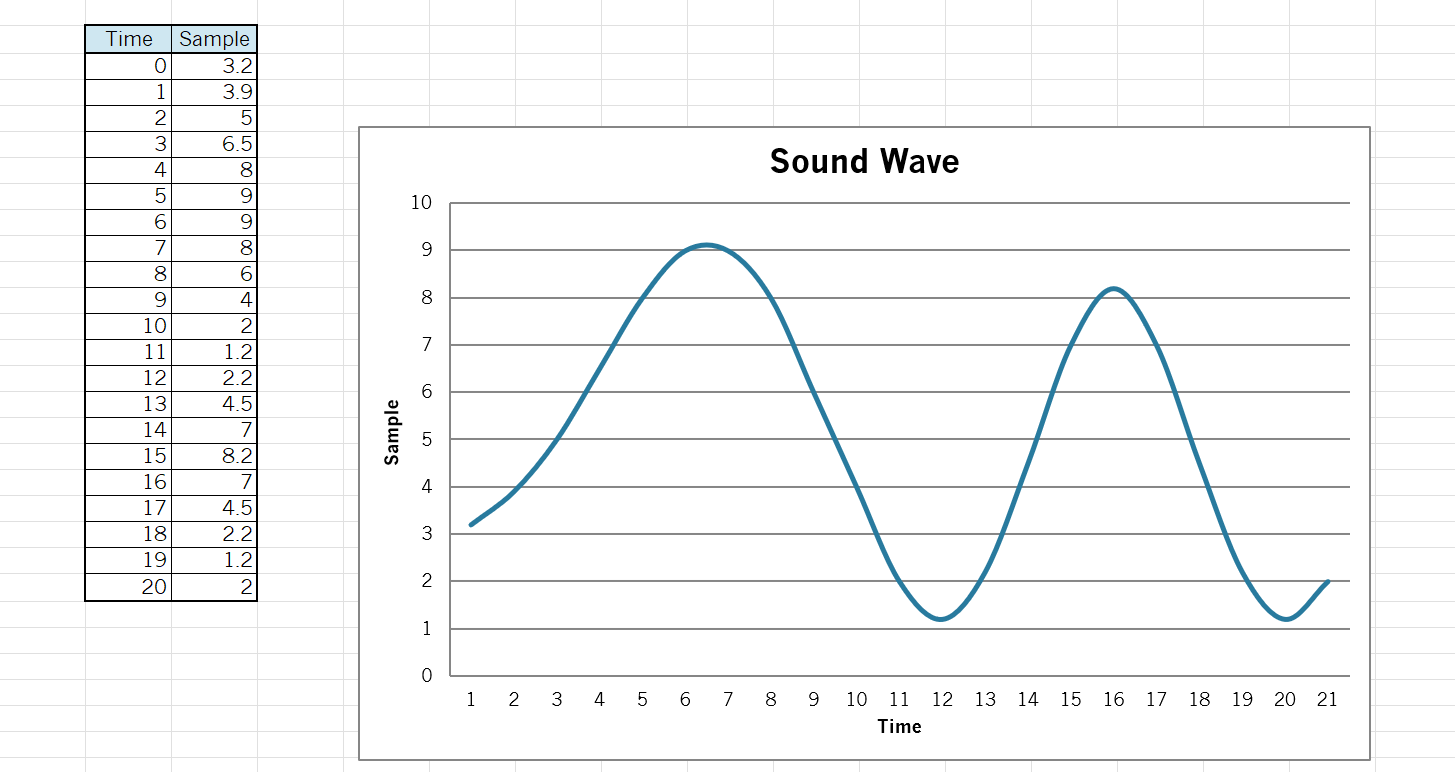
Explain that sound waves are analogue and that, in order to store the waves digitally on the computer, we need to convert the waveform into a numerical representation so that the waveform can be stored in binary. To do this, we use an Analogue-to-Digital Convertor (ADC). 

Describe how the ADC works by taking samples of the sound wave at regular intervals and display the following diagram:
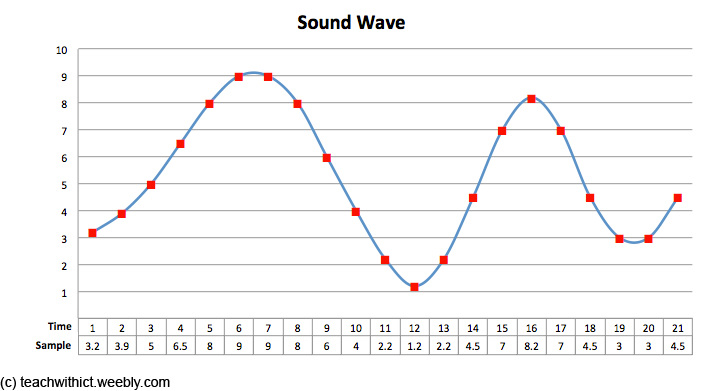
Graph titled ‘Sound Wave’ with red squares marking sampled values at different times. The x-axis is labeled ‘Time’ and the y-axis is labelled ‘Sample’.
The effect of sample rate, duration and bit depth on the playback quality and size of a sound file

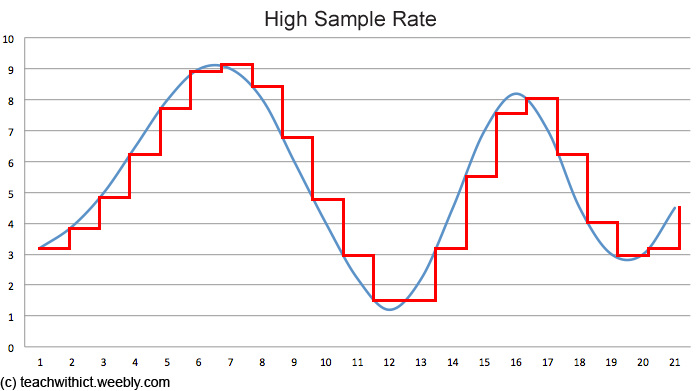
Next, explain how the quality and size of the file is affected by a number of factors - sample rate, duration and bit depth. 

Sample rate

Explain that the sample rate refers to the number of samples taken every second and that the greater the frequency of the samples, the better the sound quality.

Bit depth

Also explain that bit depth refers to the number of bits used to store each sample. Just as with images, the more bits that are sampled, the better the accuracy of the sound but also the greater the file size. Inform students that typical bit depths are 16 bit and 24 bit.
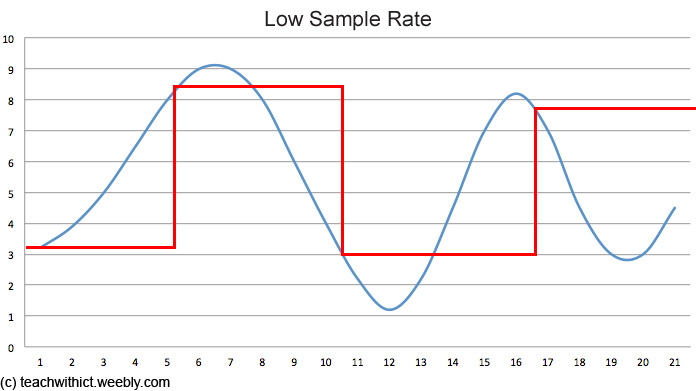
Graph with two lines: a smooth blue line and a step-like red line, showing how lower sample rates result in less detailed data.
Graph with two lines: a smooth blue line and a step-like red line, showing high sample rate data.
What is bit rate?

Explain that bit rate is simply a measure of how much data is processed for each second of sound. Inform students that the bit rate can be calculated by using the following equation:

Bit rate = sample rate × duration(s) x bit depth

Say, as with sample rate, the higher the bit rate, the better quality of the sound.

Finally, play the two samples from the beginning of the lesson and ask the students if they can identify which one was converted using the lower sampling rate.

Main:

Option 1

Give students the following spreadsheet. Instruct students to fill in the following samples and map out the sound wave:
sound_sampling_task.xlsx
File Size: 45 kb
File Type: xlsx
Download File

Samples:
Time Sample
03.2
13.9
25
36.5
48
59
69
78
86
94
102
111.2
122.2
134.5
147
158.2
167
174.5
182.2
191.2
202
ADC coverter in Excel

​Answer sheet:
sound_sampling_task_answer.xlsx
File Size: 47 kb
File Type: xlsx
Download File

Option 2

  • Direct students to: ​https://www.teachwithict.com/adc_simulator.html
  • Ask students to experiment with the app by changing the sample rate and bit rate.

Questions for students to consider:
​

  • How does the sampled waveform change when you reduce the sample rate?
  • What happens to the binary values when you lower the bit depth?
  • What kinds of wave shapes give simple binary patterns?
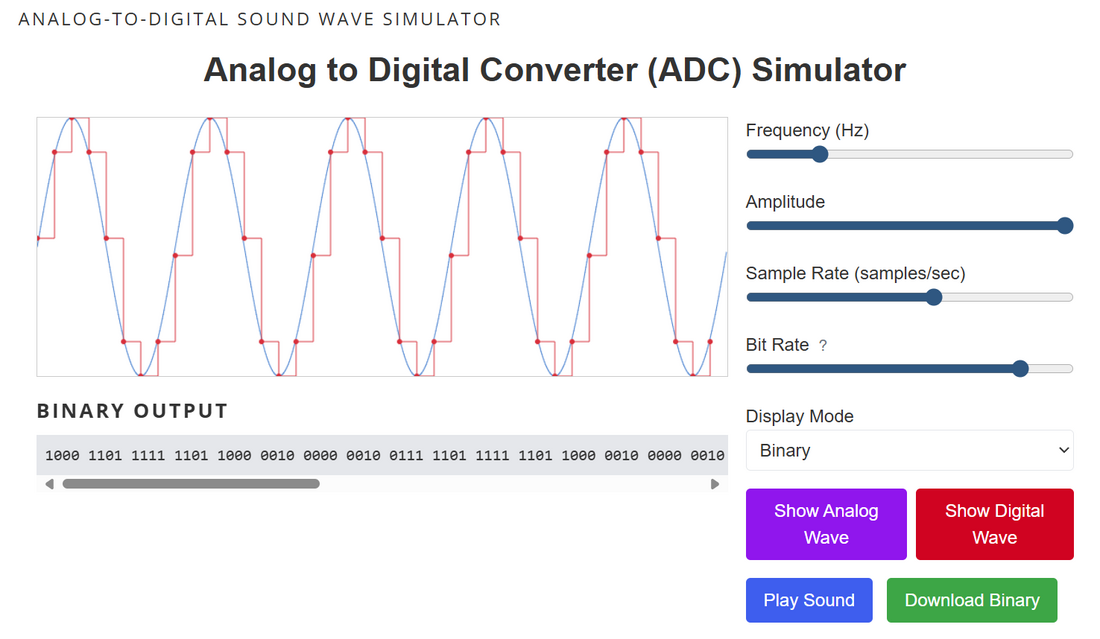
ADC converter simulator app
Analog to Digital Converter (ADC) Simulator
Option 3

Use Audacity (Free) to explore how sound is stored on a computer. Provide students with a sample .MP3 file (see starter). Instruct students to open the file in Audacity and zoom in to see the value of each sample. Ask students to export the sound file using different sample rates and investigate the effect the sample rate has on sound quality.
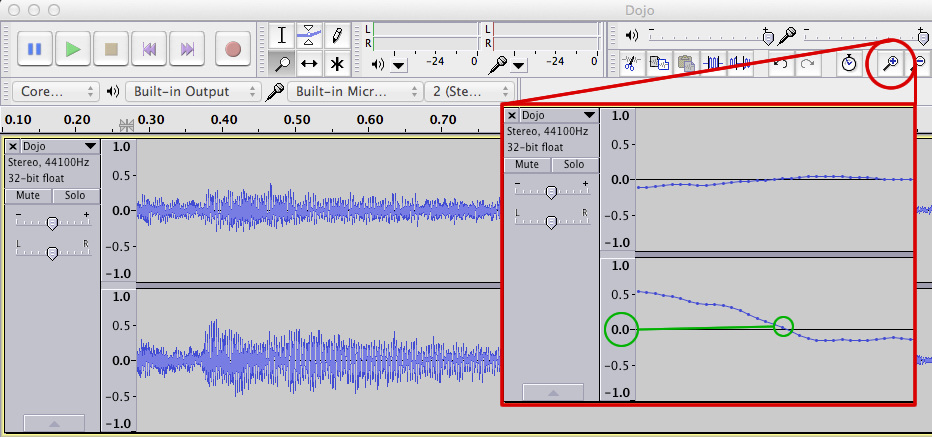
Sample rate as seen using Audacity

Useful Resources:

  • Analog to Digital Converter (ADC) Simulator

Frequently Asked Question

Q1: What is binary representation of sound?
  • A1: Sound is converted into a series of binary numbers (0s and 1s) that computers can process and store.

Q2: How is sound converted to binary?
  • A2: Sound waves are sampled at regular intervals, and each sample is assigned a binary value based on its amplitude.

Q3: What is sampling rate?
  • A3: The number of samples taken per second, measured in Hertz (Hz). Higher rates capture more detail.

Q4: Why is binary representation important?
  • A4: It allows digital devices to store, manipulate, and transmit sound efficiently and accurately.

Tags: Binary Representation, Binary Representation of Sound, Sound, MP3, WMV, WAV, encoding, Amplitude, Frequency, Pitch, Sample rate, Tags: GCSE, KS4, Theory, Computing Theory, CS Theory, Binary, Binary Representation, binary 2, binary conversion, how to do binary conversion, counting binary, binary number to decimal, binary 101, 8 binary, binary digits, binary digit, meaning of binary
  • Home
  • AI
    • AI Literacy >
      • AI Alliteration
      • Describing Monsters
      • Dystopian writing
      • Bringing literacy to life with AI
      • AI Literacy Prompts
    • AI Computing >
      • AI Computing Lessons >
        • Fake News
        • Make me happy
        • Chatting Robot
        • Supervised Learning
        • Fooled
        • Socratic Debate
        • Moral Machine
        • Invisible Animals
      • AI Coding Strategies
      • AI Computing Prompts
    • AI Prompts
  • Teaching & Learning
    • Wellbeing
    • Blog
    • Humour >
      • Teacher Humour
      • Teacher Humor
    • PLN Challenge >
      • Covering your backside
      • Online Privacy
      • Twitter Challenge >
        • Twitter All Star
        • Challenge 1
        • Challenge 2
        • Challenge 3
        • Tips for staying safe on Twitter
        • Tips for hosting Edu Twitter Chats
        • Tips for taking part in Twitter chats
        • It's all about the hashtag! Essential chats for educators
        • How to storify a chat
        • How to schedule Tweets
        • Twitter Lists
        • NT2tEU
      • Facebook Challenge >
        • Challenge 4
        • Challenge 5
        • Challenge 6
        • Tips for staying safe on Facebook
      • Google Challenge >
        • Challenge 7
        • Challenge 8
        • Challenge 9
      • Pinterest Challenge >
        • Challenge 10
        • Challenge 11
        • Challenge 12
        • Tips for using Pinterest
      • Blog Challenge >
        • Challenge 13
        • Challenge 14
        • Challenge 15
        • How to create a classroom blog
      • Staffrm Challenge >
        • Challenge 16
        • Challenge 17
        • Challenge 18
      • Skype Challenge >
        • Challenge 19
        • Challenge 20
        • Challenge 21
      • Edmodo Challenge >
        • Challenge 22
        • Challenge 23
        • Challenge 24
      • TeachMeet Challenge >
        • Challenge 25
        • Challenge 26
        • Challenge 27
      • In-school challenge >
        • Challenge 28
        • Challenge 29
        • Challenge 30
      • 30 ways to grow your PLN
    • Tools for Teachers >
      • Web 2.0 >
        • Top 10 Web 2.0 Tools
        • Classroom Response Tools
      • Quiz Tools
      • Classroom Management Tools
      • Software >
        • Media Conversion Tools
        • Application Software
      • Multimedia >
        • Free Music
    • BYOD
    • Digital Leaders >
      • Digital Leaders Blog >
        • DL Archive
      • DL Tips
      • Quotes
      • Links
    • Flipped Learning >
      • Flipped Classroom vs. Blended Classroom
    • Gamification >
      • Gamification vs. Game Based Learning vs. Game Design
    • School Closures
    • Game Based Learning >
      • Minecraft >
        • Minecraft in Education
        • Minecraft Lesson Ideas
        • Minecraft Literacy
        • Real Life Minecraft
        • Minecraft Top Tips
        • Minecraft Coding Tutorials >
          • Minecraft Code Builder Setup
          • Minecraft Code: Walking on Air
          • Minecraft Code: Hello World
          • Minecraft Code: Functions
          • Minecraft Code: Rainbow
          • Minecraft Code: Skyscraper
          • Minecraft Pixel Art >
            • MC Pixel Art Painter
    • The magic of >
      • The magic of Computing
      • The magic of Maths
      • The magic of Science
      • The magic of Literacy
    • Road2e2
    • T&L Blog
  • Computing
    • Computing Blog >
      • GCSE Computer Science
      • General
    • Teaching Computer Science >
      • CPD >
        • Blocks to Code
        • Tutorials >
          • How to embed Flash into PowerPoint
          • How to embed YouTube videos in to PowerPoint
          • How to create a wiki
          • How to create a classroom blog
      • Schemes of Work
      • Programming Resources
      • Theory
      • Posters >
        • Binary Posters
        • Coding Posters
      • Festive Computing Activities
      • FLOPPYS 2020
      • FLOPPYS 2021
      • FLOPPYS 2022
      • Game Design
      • App Creation
    • Theory Lessons >
      • Theory Tests
      • Computer Hardware >
        • Input / Output
        • CPU
        • LMC
        • Storage Devices
        • Memory (RAM / ROM)
        • Hardware
      • Binary Lessons >
        • Units of Data
        • Binary & Denary >
          • Binary & Denary (Festive)
        • Binary Representation of Images >
          • Binary Representation of Images (Festive)
          • Pixel Painter
        • Binary Representation of Characters
        • Binary Representation of Sound >
          • ADC Simulator
        • Binary Representation of Instructions
        • Binary Addition
        • Hexadecimal
      • Software >
        • Operating System
        • Types of Software
        • Utility Software
      • Programming >
        • Flowcharts >
          • Tea Algorithm
          • Flow diagrams
      • Computational Thinking >
        • Data Science
    • Digital Literacy >
      • Social Media (Good or Bad thing?)
      • Cyberbullying
      • Staying Safe Online
    • Games >
      • Binary Games >
        • Binary Blitz!
        • Binary Brainiac
        • Binary Blaster
        • Binary Blast Off
        • Binary Flip
    • Binary >
      • ASCII Converter
      • Binary to Decimal
      • Binary to Hex
      • Binary Calculator
    • Escape Rooms >
      • Breakout Edu
      • Escape Timers >
        • Escape Timer
        • Team Timer
        • Binary Timer
      • Binary Escape
    • ICT Strand >
      • Fake News Project >
        • Fake News 1
        • Fake News 2
        • Fake News 3
        • Fake News 4
        • Fake News 5
      • Spreadsheet Modelling
      • Superhero Movie Trailer
      • PowerPoint Task
      • Digital Imaging
      • Paint 3D Tutorial
    • CS Toolkit >
      • AI Toolkit
      • Binary Toolkit
      • Coding Toolkit
    • Coding Strategies >
      • Worked Examples
      • Code Tracing
      • Parsons Problems
      • PRIMM
    • Programming Lessons >
      • Scratch >
        • Festive Scratch >
          • Music Festive with Scratch
          • Turtle Snowflakes
          • What's your elf name
          • Secret Santa
        • Making music with Scratch
        • Sorting Hat Lesson
        • Turtle Time
        • Superhero name generator
        • Compliment Generator
        • Magic 8 ball
      • Python >
        • Chatbot
        • Coding Golf
        • Turtle Time >
          • Turtle Instructions
        • Magic 8 ball
        • Python Mad Libs
        • Rock Paper Scissors
        • Shakespearean Insult Generator >
          • Shakespearean Insult Generator Part 2
        • Compliment generator
        • Sorting Hat
        • Superhero name generator
        • Cards Against
        • Guess the word
        • Guess the number
        • Festive Python >
          • What's your elf name
          • Secret Santa
          • Turtle Snowflakes
          • Let It Snow
      • Little Man Computer
      • Hour of Code >
        • Hour of Code Music
        • Python Tutorials
        • HoC 8-Bit Challenge
        • Music MicroPython (Festive)
      • Raspberry Pi >
        • Networking the Pi
        • Minecraft Pi
        • Harry Potter Sorting Hat >
          • Harry Potter Sorting Hat (GPIO)
        • Raspberry Pi LTSP (Networked Classroom)
        • Astro Pi
    • Homeschooling
    • Remote Learning >
      • Fun Python Tutorials
      • Python Tutorials >
        • Chatbot Tutorial
        • Dice Roll
        • Turtle Tutorial
        • Magic 8 ball
        • Sorting Hat
        • Rock Paper Scissors Tutorial
        • Cards Against
        • Python Mad Libs
        • Shakespearean Insult Generator >
          • Shakespearean Insult Generator Part 2
        • Guess the word
        • Guess the number
        • Superhero name generator
        • Compliment generator
        • Festive Python Tutorials >
          • What's your elf name
          • Secret Santa
          • Turtle Snowflakes
      • Scratch Tutorials >
        • Sorting Hat
        • What's your superhero name
        • Turtle Time Tutorial
        • Compliment Generator
        • Magic 8 Ball
        • Festive Scratch Tutorials >
          • Festive Music with Scratch
          • Secret Santa Scratch Tutorial
          • Turtle Snowflakes Tutorial
          • What's your elf name
    • Revision >
      • Data Representation >
        • Binary Representation of Images
        • Binary Representation of Sound
  • 21 Things
    • 21 Things To Try >
      • ConnectEd
      • Social Media >
        • Twitter
        • Pinterest
        • Facebook Groups
        • Facebook Pages
        • Google+ Communities
        • Staffrm
        • Edmodo
        • Mystery Skype
        • Blogging
        • Classroom Blogging
      • Gamification
      • Flipped Classroom
      • Breakout Edu
      • Edu Podcasts
      • Jar of Awesome
      • TeachMeet
      • Team Teaching
      • Mixed Reality
      • Digital Leaders
      • Genius Hour
      • Sketchnoting
    • Computing >
      • CS 20
      • Code Golf
      • PRIMM
      • Under The Hood
      • Unplugged
      • Podcasts
      • Facebook Groups CS
      • Flipped Classroom CS
      • Teach with Magic
      • Socratic Debate
      • Coding Music
    • 21 Things Keep Fit >
      • 20 Health Hacks
      • Home Health Hacks
    • 21 Things PLN >
      • Edmodo
      • Twitter
      • Reply to a blog
      • Skype
      • Cofee Edu
      • Pinterest
      • Reach out
      • Conferences
      • Instagram
      • Ning
      • MEC
      • Voxer
      • LinkedIn
  • Microbit
    • Physical Computing >
      • micro:bit LEDs
      • micro:bit PIR
      • micro:bit Servo
      • micro:bit Temp
      • micro:bit LDR
      • micro:bit Moisture
      • micro:bit RGB LEDs
      • micro:bit HC-SR04 3v3
      • micro:bit HC-SR04 5v
      • micro:bit Push button
      • micro:bit Potentiometer
      • micro:bit Piezo
    • Music >
      • Music Festive
    • Festive Projects
    • Projects >
      • Music
      • Music MicroPython
      • Servo Animals
    • Lessons >
      • Magic 8 Ball
      • Harry Potter Sorting Hat
    • Quick Start Guide
    • Microbit Simulator
  • #100 Ideas
    • Testimonials
    • Competition >
      • Competition 2
    • Worksheets
    • Bonus Ideas >
      • What's your elf name
      • Make me happy
      • Guess the word
      • Cards Against Humanities
      • Compliment generator
      • Data Science
    • Curriculum
    • ISTE
    • CSTA
  • About
    • Privacy